


In Short: Three Facts That Decide Most Disclosure Questions
Most disclosure mistakes start with treating every edited image as the same kind of asset. The practical rule is narrower.
- Classify first: AI-generated vs. AI-assisted. AI-generated content must be disclosed. AI-assisted content does not. Apply the category label before writing copy, tagging an asset, or briefing a reviewer.
- Apply visual labeling only where it fits. Visual labeling applies to photos and videos containing photorealistic AI-generated people. Carve out AI-altered real people, and carve out TV, video game, or movie characters.
- Do not assume the declaration executes itself. A human must classify the asset, tag it, and record the decision. That record is the operating control; without it, teams cannot show why an asset was disclosed or skipped.
As of the writing date, this three-part check is the fastest way to keep disclosure decisions consistent across a listing review. It also prevents the costlier outcome: a late correction that interrupts the listing cycle after creative and copy are already locked.
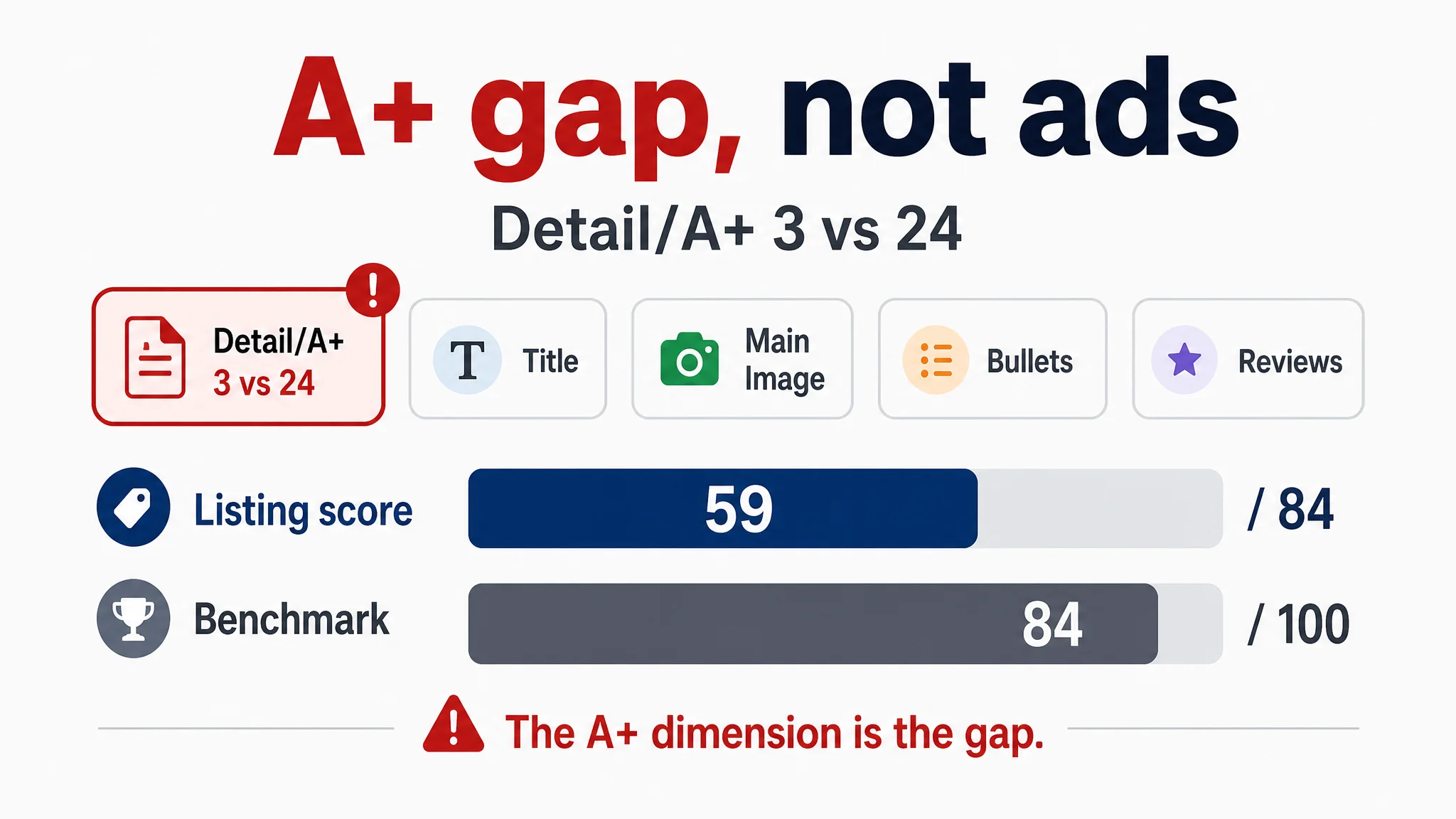
Asset-level review is not only a disclosure formality. In a recent US beauty listing review, a seller operating a rice and black rice exfoliating mist set for face and body was facing rising ad costs and slow orders. The team’s first read was “we just do not have enough reviews” and “the ads need more tuning.” But the structured Listing diagnosis against a benchmark exfoliating mist Listing told a different story: the Listing scored 59 against 84, and the detail/A+ dimension scored 3 against 24. The page was not failing because the ad console had one more switch to flip. It was failing because the visual asset set did not explain what the set was, how it should be used, or why two bottles belonged together. That is why classification, labeling, and human sign-off have to be treated as operating controls rather than paperwork.
Where the Rules Actually Live - and Why Third-Party Summaries Are Not Authority
The authority for visual compliance is not a screenshot in a team chat or a vendor’s checklist. For listing images and copy, start in Amazon Seller Central and the official Amazon generative-AI and listing-content policy pages. For ad creative, use the Amazon Ads policy pages. For published book content, use the KDP Help Center. These are the surfaces where the current rule set is stated and maintained.
Treat official Help Center wording as the controlling source. It outranks any blog, agency deck, or tool vendor summary, including this article. Third-party guidance can help you notice a risk area, but it cannot certify compliance. When a summary and an official page conflict, the official page wins. When a tool cites a requirement, open the official page and read the current wording yourself.
This article reflects our understanding as of the writing date. Policies and enforcement details can change, so re-verify the current official wording before publishing or refreshing a listing. Build that check into the handoff between design, content, and launch.
Disclosure by Content Type: A Compact Map
Disclosure is decided per asset, not per project. A single listing can contain one file that is clearly AI-generated and another that carries only light human-directed assistance, and the two do not share a status. Use the map below as the first pass, then confirm any unresolved row before publishing.
- AI-generated book text: What falls inside this row: Manuscript or sections produced by a generative model, Disclosure status: Verify against official policy
- AI-drafted chapters: What falls inside this row: Chapters drafted by AI, then edited or approved by a human, Disclosure status: Verify against official policy
- AI-generated cover art or interior illustrations: What falls inside this row: Cover images, figures, or artwork produced by a generative model, Disclosure status: Verify against official policy
- AI-assisted work: What falls inside this row: Research support, structuring, outlining, fact-checking, Disclosure status: Verify against official policy
- Translated text: What falls inside this row: Machine translation or AI-drafted translation, with or without human review, Disclosure status: Verify against official policy
- Listing-side visuals: What falls inside this row: Main image, secondary and lifestyle imagery, A+ content modules, Disclosure status: Verify against official policy; A+ modules should be reviewed module by module, not as one blanket asset
Boundary case. Puzzle or grid content produced by a deterministic, non-AI generator is generally not AI-generated content. The moment AI writes the clues, the introduction, or the cover art, that specific element enters AI-generated territory and should be treated on its own.
Two operating notes keep the map honest. First, an unresolved row is not a "no" — it is an open item, logged with an owner and a resolution date. Second, visual assets now carry real commercial weight: main images and A+ modules drive CTR and CVR, so a disclosure decision made late, after assets are already loaded into the listing, is far more expensive than one made at the brief stage.
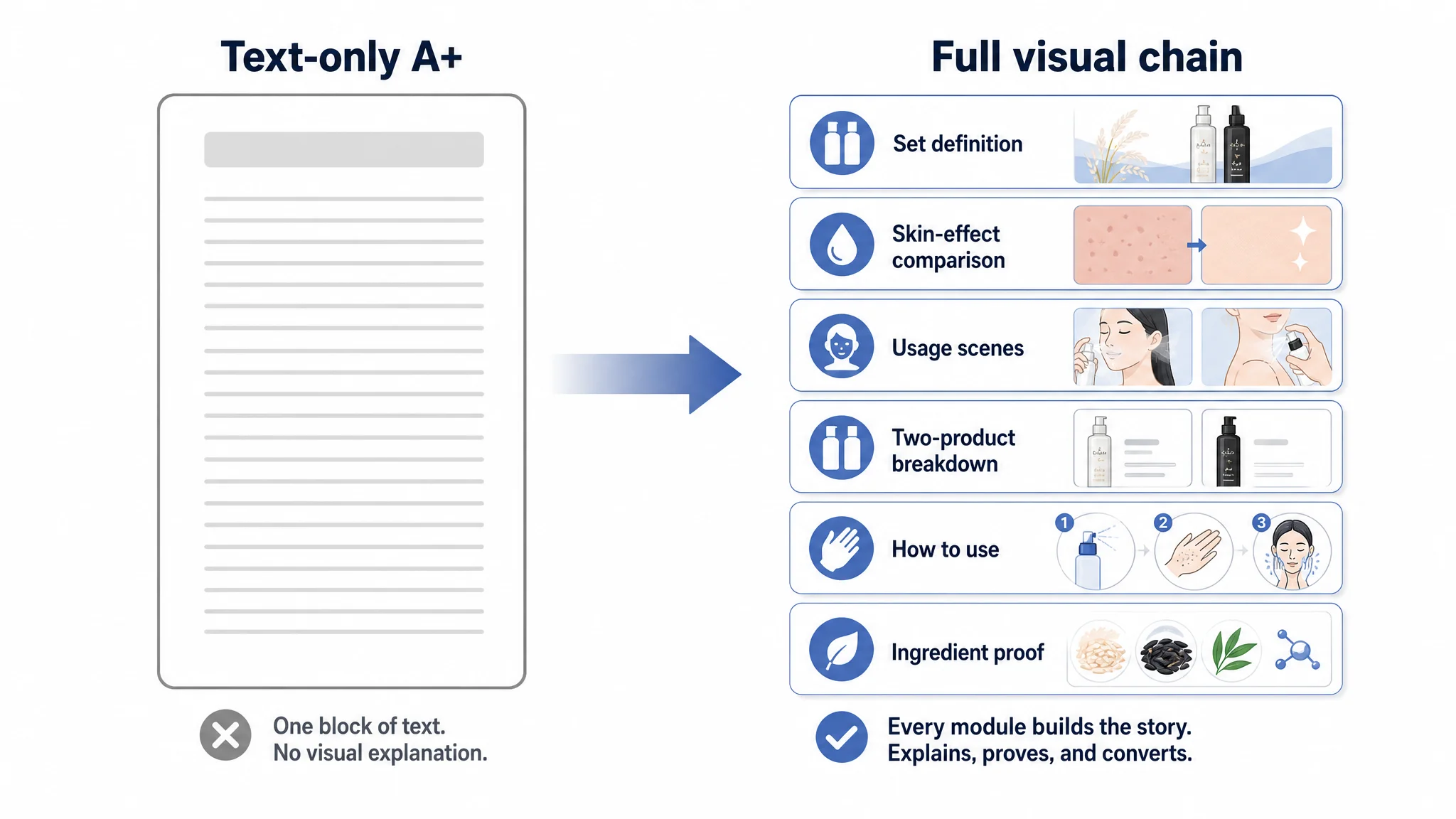
The module-by-module note is not a theoretical caution. In the same exfoliating mist listing, the A+ area was essentially one block of text with no images, while the benchmark used a full visual chain: set definition, skin-effect comparison, usage scenes, two-product breakdown, how-to-use steps, and ingredient proof. The gap was not a minor layout preference. It meant shoppers had to infer the product story themselves, and the weakest visual module became the biggest conversion bottleneck. A row-by-row review of A+ modules would have surfaced that earlier than a blanket review of the listing.
How to Word Your Disclosure: A Short Example Set
Disclosure wording works best as a short, repeatable pattern rather than a fresh writing task each time. The aim is to describe the role AI played clearly and consistently, so reviewers and customers can understand it without interpretation.
- AI-drafted chapters with substantial human editing: “Drafted with AI assistance and substantially edited by [human/team].” Keep the AI-generated classification even when editing is heavy; substantial editing does not move AI-generated text into the AI-assisted category.
- AI-generated cover or interior art: “Cover art generated with AI tools.” / “Interior illustrations generated with AI tools.”
- AI-generated lifestyle imagery in a listing: “Lifestyle image generated with AI tools for this listing.”
- AI-assisted work such as outline feedback or fact-checking: “AI-assisted outline feedback” or “AI-assisted fact-checking.” Use assistance wording only where AI supported a human-led task.
These are illustrative phrasings, not official required language. Use one pattern consistently, and let the disclosure match what the asset actually is.
What You Must Disclose: AI-Generated Versus AI-Assisted
The deciding question is not whether AI touched the file. It is who or what produced the substantive content, and whether the tool’s output became the shipped material. A writer may use AI to outline, rephrase, or check tone; if a human still originates and owns the substantive claims, the work is AI-assisted. If the tool produced the core expression that ships, disclosure is required.
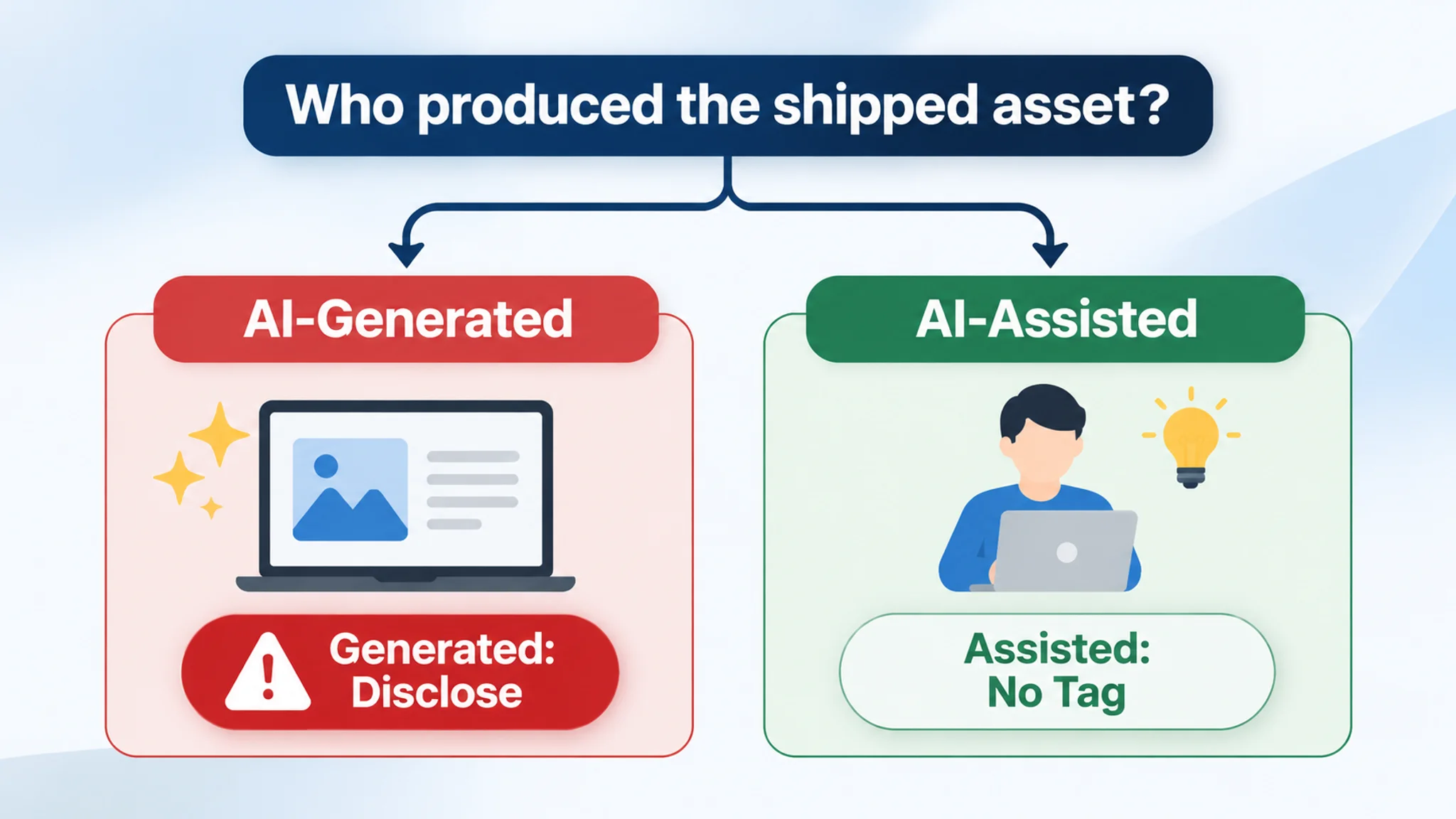
Concrete cases show the line. AI-drafted chapters remain AI-generated even after heavy editing, because the shipped structure and prose began as tool output. AI-generated cover art must be disclosed. So must imagery containing AI-generated photorealistic people, which is the scope the labeling requirement explicitly addresses.
That scope is narrow. The labeling requirement covers photos and videos containing photorealistic AI-generated people; it does not extend to AI-altered real people or to TV, video game, and movie characters. This scope should not be broadened into a blanket rule for every marketplace or format.
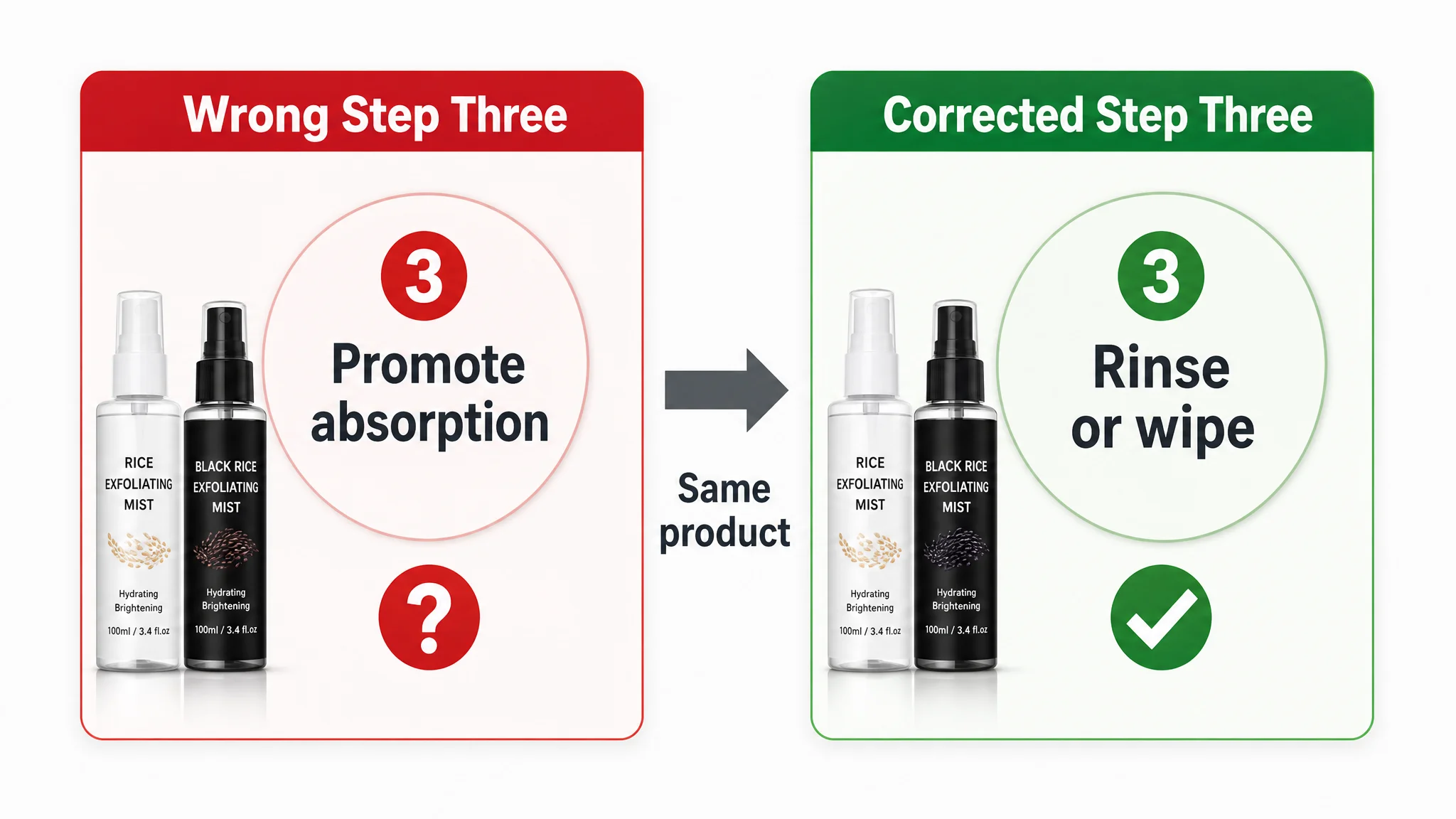
A separate but related review issue appears when a visual is technically disclosable but operationally misleading. In the exfoliating mist listing, one main image carried a three-step guide whose third step said “Massage gently to promote absorption,” while the product logic and bullet copy said to spray on dry skin, massage until residue rolls off, then rinse or wipe. The image may have passed a superficial design review, but it contradicted the product’s use. That is not an AI-classification question; it is a reminder that disclosure review should not be the only review lane. The asset still has to be true to the product.
Keep the review rule simple: AI-generated content must be disclosed, while AI-assisted content does not. If the team cannot show a human origin for the substantive content, treat the asset as AI-generated and route it to disclosure review before publishing.
What You Don't Need to Disclose
Over-declaration carries a real cost. Every asset pushed into an unnecessary review loop consumes reviewer attention, lengthens the listing cycle, and nudges teams toward blanket statements that blur the distinctions that actually matter. Start by drawing the boundary around what stays out of scope.
Routine assistance does not convert your work into AI-generated content:
- Research help during category or competitor analysis
- Feedback on an outline or structure
- Fact-checking your own draft
- Editing your own writing
None of these turn an asset into something that requires visual labeling. More broadly, AI-assisted work is not the disclosure trigger. The trigger sits with the final visual asset and how it was produced, not with the tools that helped you think, draft, or revise. Keeping that line clear protects CTR and CVR by keeping review cycles short and claims precise.
Two categories also fall outside the visual labeling scope as described: AI-altered depictions of real people, and content built on TV, video game, or movie characters. Routing these into disclosure adds review load without adding customer clarity.
Keep internal fields separate from anything customer-facing. An internal disclosure field is a back-office record. A customer-facing indicator is a different mechanism, and Amazon describes it as applied "where applicable." That wording should not be read as automatic or universal. The display criteria for a customer-facing indicator are unresolved, so no one can promise a specific asset will never carry one, and no one should describe a rule for when it appears. Naming what is still unknown makes the rest of your claims easier to trust.
The Metadata and Keyword Tagging Step for Images and A+ Content
The declaration happens at the asset, not at the listing. As reported, when a visual contains an AI-generated person — whether a still image or a video asset — the seller indicates that fact through metadata attached to the asset itself, and does so before the asset is uploaded into listing imagery or an A+ content module. This is a human action performed during asset preparation. The system does not inspect a file, determine that a person inside it was AI-generated, and declare it on the seller's behalf.
A+ modules deserve the same discipline as main and secondary images. They are uploaded visual content with their own asset records, so a module depicting an AI-generated person raises the same question as a primary image and should be checked at the same stage — during preparation, not after it has been placed into a display position.
That module-level discipline matters because A+ is where many listings either complete the sale or lose it. In the exfoliating mist review, the A+ area had no visual evidence, no how-to-use block, no ingredient explanation, and no before/after; the benchmark had all of those. The seller’s main-image set even scored slightly higher than the benchmark on paper, 26 versus 24, but the page still could not convert because the visual story was incomplete and, in one step, contradictory. Tagging the asset correctly is necessary; reviewing whether the asset itself earns its place is the next control.
Treat the metadata field as a step you confirm rather than a status you trust. Before upload, verify the current field and its wording inside the official upload flow, and note who completed the declaration for each asset. Attaching a tag records a decision; it does not complete compliance by itself. Folding this check into asset preparation keeps it from becoming a rework loop that extends listing cycle time.
The Human Review Loop: From Asset to Upload
Use one pre-upload checklist across four lanes. Apply the same three questions to each lane, then require a named sign-off before the asset moves to upload or into an ad campaign.
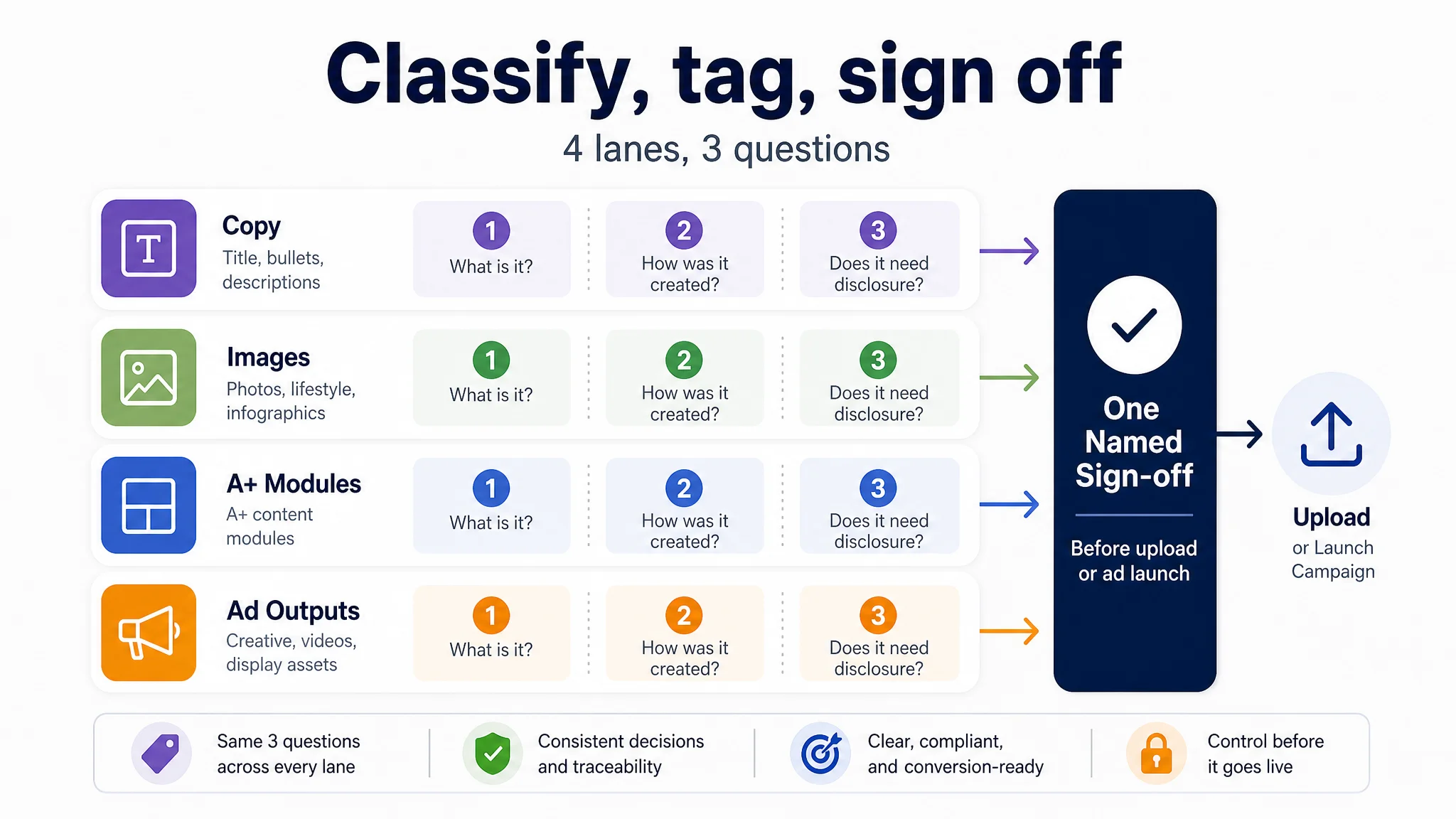
- Listing copy: Confirm whether title, bullets, and backend copy are AI-generated or AI-assisted; confirm disclosure or tagging is applied where required; record who signed off.
- Images and video assets: Confirm whether each asset is AI-generated or AI-assisted; confirm disclosure or tagging is applied where required; record who signed off.
- A+ content modules: Confirm whether module copy and imagery are AI-generated or AI-assisted; confirm disclosure or tagging is applied where required; record who signed off.
- Ads automation outputs: Confirm whether outputs are AI-generated or AI-assisted; confirm disclosure or tagging is applied where required; record who signed off.
The four-lane checklist would have caught a specific failure in the exfoliating mist listing: the main-image step guide told buyers to massage the mist in “to promote absorption,” while the bullets described a rinse-off exfoliation process. A reviewer working only from ad metrics or star rating would not see that contradiction. A reviewer working asset by asset would. The point of a named sign-off is not to create ceremony; it is to force someone to ask whether the image, the claim, and the product truth agree before the asset enters a listing or an ad campaign.
Sequence the work so tagging happens before upload and before the asset enters an ad campaign. Prefer a reviewer other than the asset creator. Keep a one-line record of the decision and its date.
Closing the Layout Gap: A Disclosure-Aware Listing and A+ Workflow
Most competing guidance explains the disclosure rule but stops before layout. Sellers are told what to declare, not where the declaration checkpoint belongs in the listing or A+ page, so teams improvise per asset: one person remembers the claim caveat for the title, another drops it from a trust module, and the classification decision lives in memory instead of in the work.
DeepBI’s Amazon-only listing and A+ drafting structure closes that gap by organizing title, bullet, and module copy in a consistent frame with an explicit disclosure-review field in the drafting structure. The review travels with the asset: core selling-point copy, trust-endorsement proof, and action-guide modules each carry their classification decision forward, so rework and listing cycle time fall rather than the decision being rediscovered at upload. The same structure keeps uncertain specifications visible for later completion instead of inviting invented values.
The exfoliating mist review is a concrete example of that layout gap. The seller did not need a new ad structure first; it needed the page to say what the set was, which bottle did what, how to use it on face and body, and why the product would not feel sticky. DeepBI’s diagnosis put the detail/A+ gap at 3 versus 24, and the fix was not a cosmetic refresh. It was a module-level rebuild: solution definition, visible benefit, gentleness and hydration, usage scenes, how-to-use steps, ingredient proof, and final reassurance. That is the difference between a disclosure-aware workflow and a page that merely carries a disclosure field.
This is a compliance-assist workflow built on module-level review touchpoints. It is not a compliance guarantee, a certification, or automated policy approval, and it does not replace Amazon’s own review.
Keeping Evidence: Version Notes That Survive an Audit Question
Inside the module, treat every visual and copy change as an asset-level record, not a folder of renamed files. For each asset, capture:
- What the asset is.
- Which category it fell into, such as main image, secondary image, A+ module, title, or bullet copy.
- When it was declared.
- Who reviewed it.
- What changed in the last revision.
A structured record is easier to scan than free text when a listing is questioned.
The exfoliating mist listing shows why the record has to cover more than images. The main-image step guide, the bullet copy, and the A+ story were not aligned: the image said “promote absorption,” the product logic said “rinse or wipe,” and the A+ area had almost no visual explanation at all. A record tied to the listing slot would have made that contradiction visible before upload. It would also have shown which asset carried the usage claim, who reviewed it, and what changed in the last revision.
Extend the same discipline to copy and A+ structure. If only images have histories, a later question about a headline, bullet claim, or A+ module becomes a search through memory. Tie each record to the listing slot or A+ module it supports, so revision history covers visual and textual content, not images alone.
Frame the record as internal risk management. It does not certify compliance or replace platform review; its value is faster resolution, clearer ownership, and a defensible trail when someone asks why an asset changed. That shortens the path from question to answer and protects CTR, CVR, and listing cycle time from avoidable rework.
Ad Creative Compliance: What to Check Before You Scale Spend
Ad creative carries the same classification duty as listing imagery: the same claims, contents, and product-truth checks apply whether a visual appears on a detail page or in a sponsored placement. A creative that implies an included accessory, alters apparent dimensions, or overstates a product effect creates a compliance question before it creates a performance question. Before uploading creative, review the relevant Amazon Ads policy pages alongside Seller Central and the KDP Help Center, and treat that review as a pre-upload checkpoint rather than a later cleanup step. The practical test is simple: the image and its adjacent claim should match the SKU, its actual contents, and its documented limits.
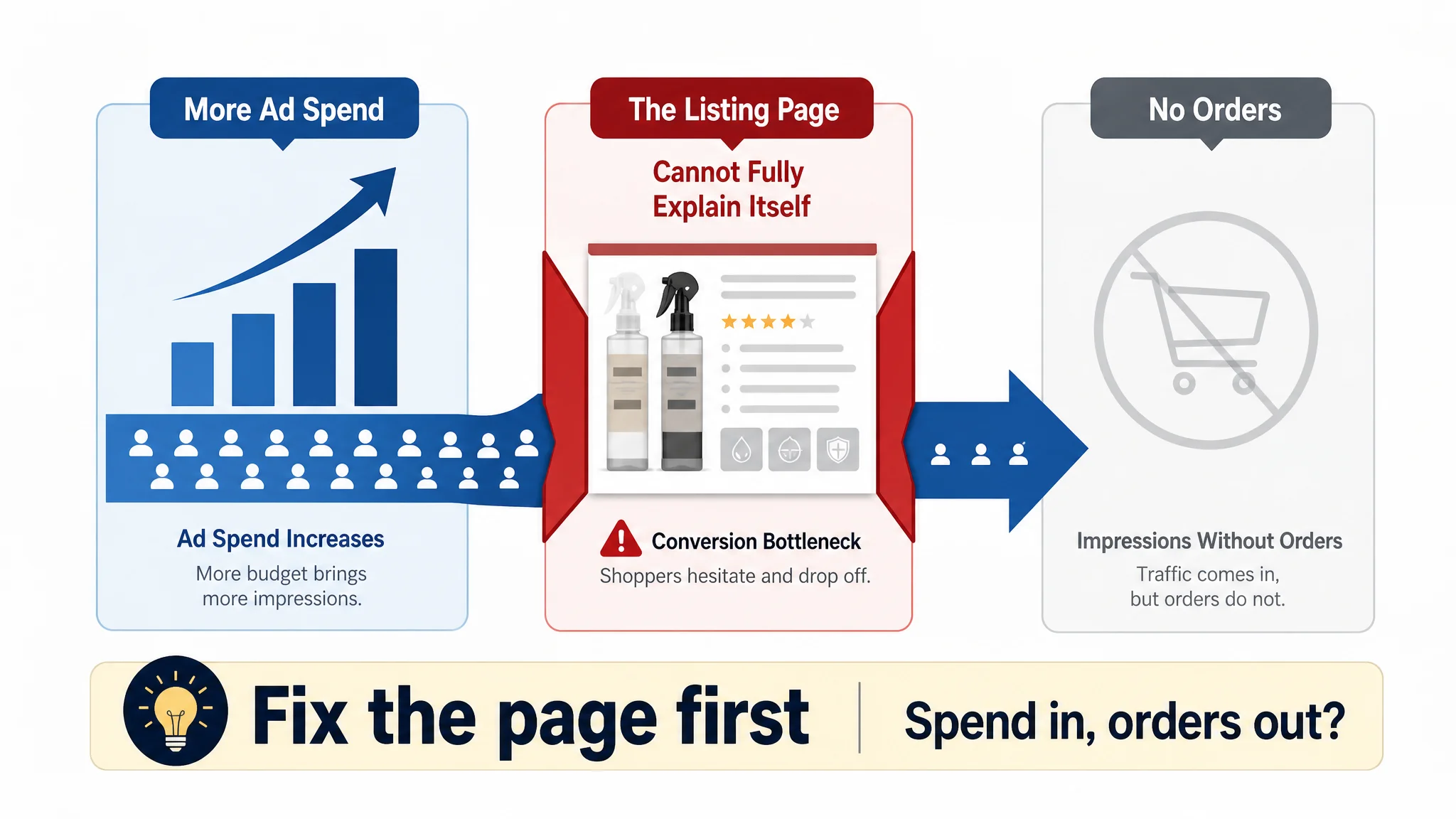
The exfoliating mist seller’s ad problem is a useful test case for that pre-upload discipline. Ads were bringing some exposure, but orders did not scale with spend; the star rating was 4.1, and review volume was low, so the team focused on reviews and ad tuning. The structured diagnosis showed the ad side was not the main constraint. The page had a title that did not anchor face-and-body use, a main-image set that confused the core use, and an A+ area that was essentially text only. More budget would have bought more impressions for a page that could not fully explain itself. That is why creative and page review belong before scale, not after performance disappoints.
DeepBI’s role is quantitative review, not image generation: it helps teams read whether a creative variant is actually earning its spend through ad performance measurement, such as CTR, CVR, and ACoS, so keep-or-retire decisions on AI-involved creative rest on evidence rather than aesthetics. That is diagnostic evidence, not a universal lift promise, and it does not replace policy review.
Why Honesty Is the Safe Play
Misrepresenting AI-generated or AI-edited imagery is a terms problem, not a marketing tactic. In the KDP context, Amazon states that undisclosed AI-generated content can lead to blocked books or account suspension. That consequence belongs to disclosure failure, not to creative quality or campaign performance. The same discipline applies to product visuals: the image must preserve the product’s structure, material, color, and verified specifications; accessories, dimensions, or use effects cannot be invented. When an image no longer matches the product, the defect is not cosmetic. It is a representation issue that can surface later as negative reviews, returns, and after-sales cost.
The same principle applies to usage claims. In the exfoliating mist listing, the main-image step guide said to massage the product in to promote absorption, while the product was designed to roll off residue and then be rinsed or wiped. That is not a minor wording issue. It changes what the buyer thinks the product does, whether it will feel sticky, and whether it is safe to leave on. An image that no longer matches the product’s use is a representation issue, and it can surface later as negative reviews, returns, and after-sales cost.
Disclosure is a policy requirement. It is not a ranking, royalty, or approval lever, and it should not be described as one. Treat it as a compliance step in the listing workflow: verify the asset, record the AI involvement, and keep the product claim truthful. Following the guidelines does not promise rankings, royalties, or approval; it only keeps the listing inside the rules. That is the safe play: reduce avoidable takedown and account risk, then let product truth and execution compete on their own merits.
Frequently Asked Questions
What must be disclosed?
AI-generated content must be disclosed, while AI-assisted content does not. In visuals, the duty applies to photos and videos containing photorealistic AI-generated people. Confirm the current scope in Amazon Seller Central before publishing.
Is disclosure shown to customers?
Internal disclosure fields are not shown to customers. Amazon has said an indicator will be shown "where applicable," but the criteria that trigger it are unresolved, so do not assume a customer-facing label follows automatically.
What is the difference between AI-generated and AI-assisted content?
Ask what produced the shipped material. If tool output became the published text or image, it is AI-generated even after heavy editing; research help, outlining feedback, and fact-checking remain AI-assisted.
What happens if I do not disclose?
Amazon states that undisclosed AI-generated content can lead to blocked books or account suspension in the KDP context. No published penalty schedule exists beyond that, so treat it as a terms risk and verify the current wording.
Does disclosure affect rankings or royalties?
No. Disclosure is a policy requirement, not a ranking, royalty, or approval lever in either direction. Following the guidelines does not promise rankings, royalties, or approval.
Do low-content formats such as puzzle or coloring books need disclosure?
Grid content from a deterministic non-AI generator is generally not AI-generated content. AI-written clues, introductions, or AI-generated cover art still are, and cover art is classified as an image asset.
How does the tagging step fit before upload?
Classify the asset, declare it, tag it through the metadata attached to the asset, then upload it into listing imagery or A+ content modules. The system does not infer this for you; confirm the current field in the official upload flow.
Where do I confirm the current official policy?
Check Amazon Seller Central and the official generative-AI and listing-content policy pages, the Amazon Ads policy pages for ad creative, and the KDP Help Center for published book content. Re-verify before publishing, as of the writing date.