

Key Takeaways
Use this checklist to decide where each keyword belongs before rewriting a field. It reflects the 2026 Amazon landscape and is current as of 2026.
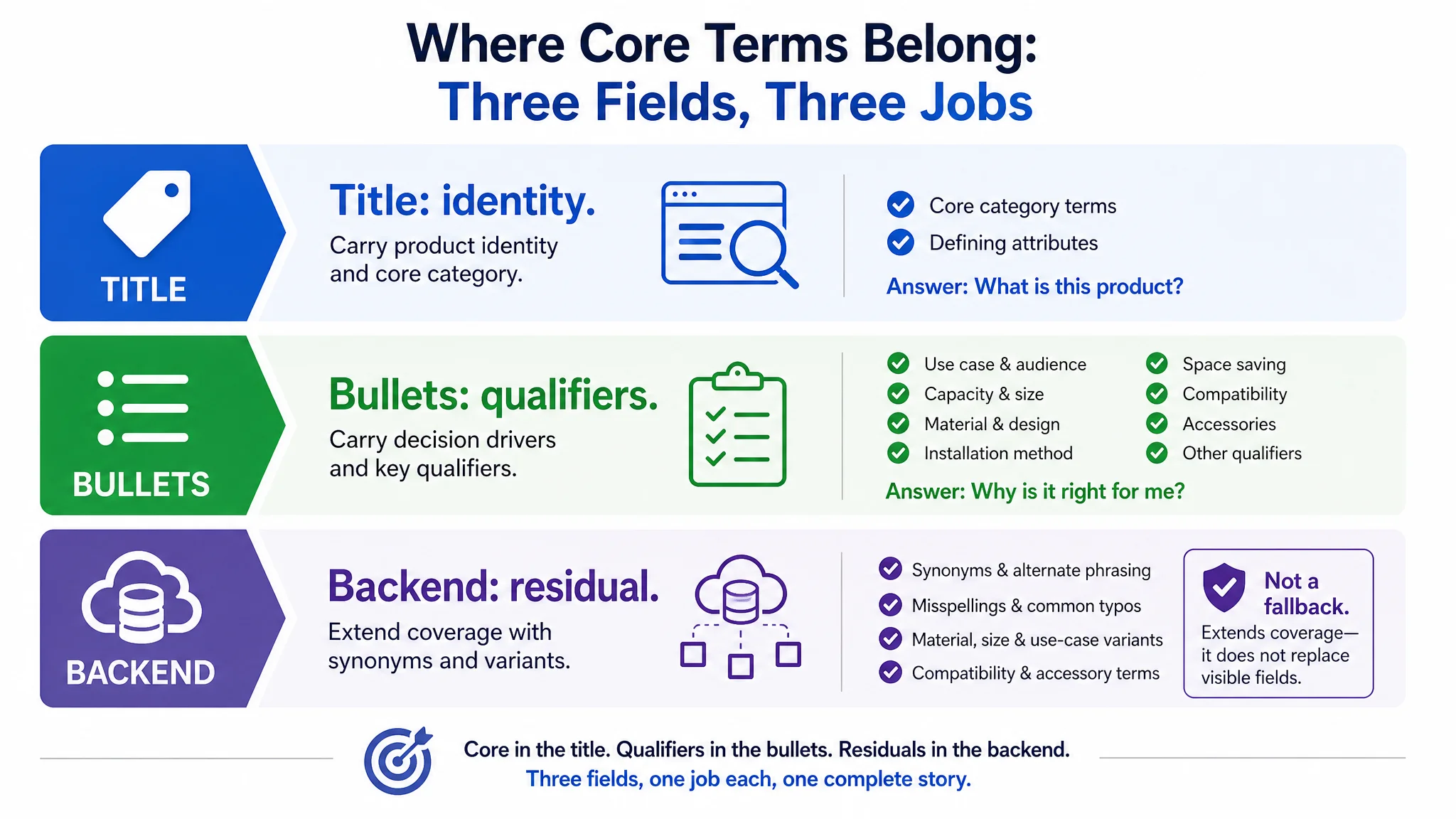
- Title carries category identity. Put core category terms and defining attributes in the title; move situation, material, size, compatibility, and audience qualifiers to bullets or backend so the title stays readable and click-relevant.
- Long-tail means specificity, not length. Select phrases that match a concrete use case, material, capacity, or compatibility need; a modest individual phrase is useful when the set covers more buyer situations.
- Backend completes coverage. Fill residual slots with synonyms, misspellings, material and size variants, and use-case phrasing; avoid repeating title words, competitor brands, or trademarks, and verify current field limits in Seller Central before publishing.
- Audit competitor field coverage. Tabulate a small set of competitor listings field by field, mark where head terms are saturated and qualifier phrases are visibly missing, and treat their copy as a research lead rather than a disclosure of their full strategy.
- Prioritize and verify changes. Compare your title and bullet coverage against high-competitiveness reference ASINs, rank the gaps, then change one field at a time and check CTR, CVR, and search-term coverage.
- Keep metadata in perspective. Field layout is one high-leverage discoverability lever among cover imagery quality, review depth, price, and traffic quality.
What Each Keyword Source Can Actually See
Evaluate a keyword source first by what it can observe, then by the field its evidence can justify.
- Volume-estimate databases. They observe modeled demand and relative volume across a keyword set. You may conclude which head terms deserve title space; you cannot prove live phrasing or competitor layout. Use them to justify title head-term selection.
- Observable search surfaces: autocomplete, related queries, and on-Amazon search result pages. These observe live query phrasing, adjacent modifiers, and the ASINs and title snippets returned for a query. Autocomplete is directional and personalized, not an exact volume-ranked feed. You may conclude which long-tail phrases and competitor terms are active; you cannot assign absolute demand. Use them to justify bullet and backend term candidates.
- Reverse-ASIN competitor research. This observes competitor titles, bullets, and term placement after you filter for comparable form, price band, and audience. It cannot measure total demand, and Bestseller-only sampling creates benchmark misalignment. Use it to justify modifier choices and bullet structure, not head-term demand.
- Amazon Brand Analytics. This observes aggregated query and click data for brand-registered sellers. Access requires a Professional account plus the Brand Representative role; treat it as a conditional source, not a universal entitlement. You may conclude relative query demand and conversion context; it does not replace field-level placement judgment.
Reverse-ASIN research is easy to misread as a complete competitor strategy. In one bathroom-storage listing, the team could see a category leader’s title and a clean five-part bullet structure, but not the leader’s ad budget or profitability. The useful signal was narrower: the competitor used bullets to answer family capacity, material and design, no-drill installation, space saving, and compatibility, while the target listing had no bullet section at all. That observation did not prove why the competitor ranked, but it justified a field-level audit of the missing mid-page terms.
For title head terms, trust volume-estimate databases first. For long-tail modifier phrases intended for bullets or backend fields, observable search surfaces and reverse-ASIN research are more reliable, because they reveal phrasing, competitor presence, and use context rather than absolute demand.
Research-First or Listing-Fix: Which Layout Workflow Are You In?
The same keyword list can yield two different placement plans. Research-first is a pre-listing workflow: keywords decide what to build and how to frame it. Listing-fix is a repair workflow: keywords decide which existing field should change.
Research-first requires breadth and category language. Gather evidence from the category node, competitor style segments, and long-tail phrasing. Autocomplete can reveal real shopper phrasing, but interpret it with personalization in mind; use a clean, signed-out session and cross-validate with a second source. At this stage, a long-tail term is more likely to be a demand hypothesis than a field instruction. Operational sequence: define the category boundary, collect category and long-tail terms, cross-validate the phrasing, then carry confirmed terms into the listing brief and field drafts.
Listing-fix requires terms that land directly in the existing title, bullet, and backend fields. You need a field-level audit: which terms already appear, which high-conversion modifiers are missing, and where CTR or CVR points to a weak field. Work in this order: audit the live fields, extract core and variant terms, assign each term to title, bullet, backend, or no slot, then verify the change through event-tagged CTR and CVR tracking.
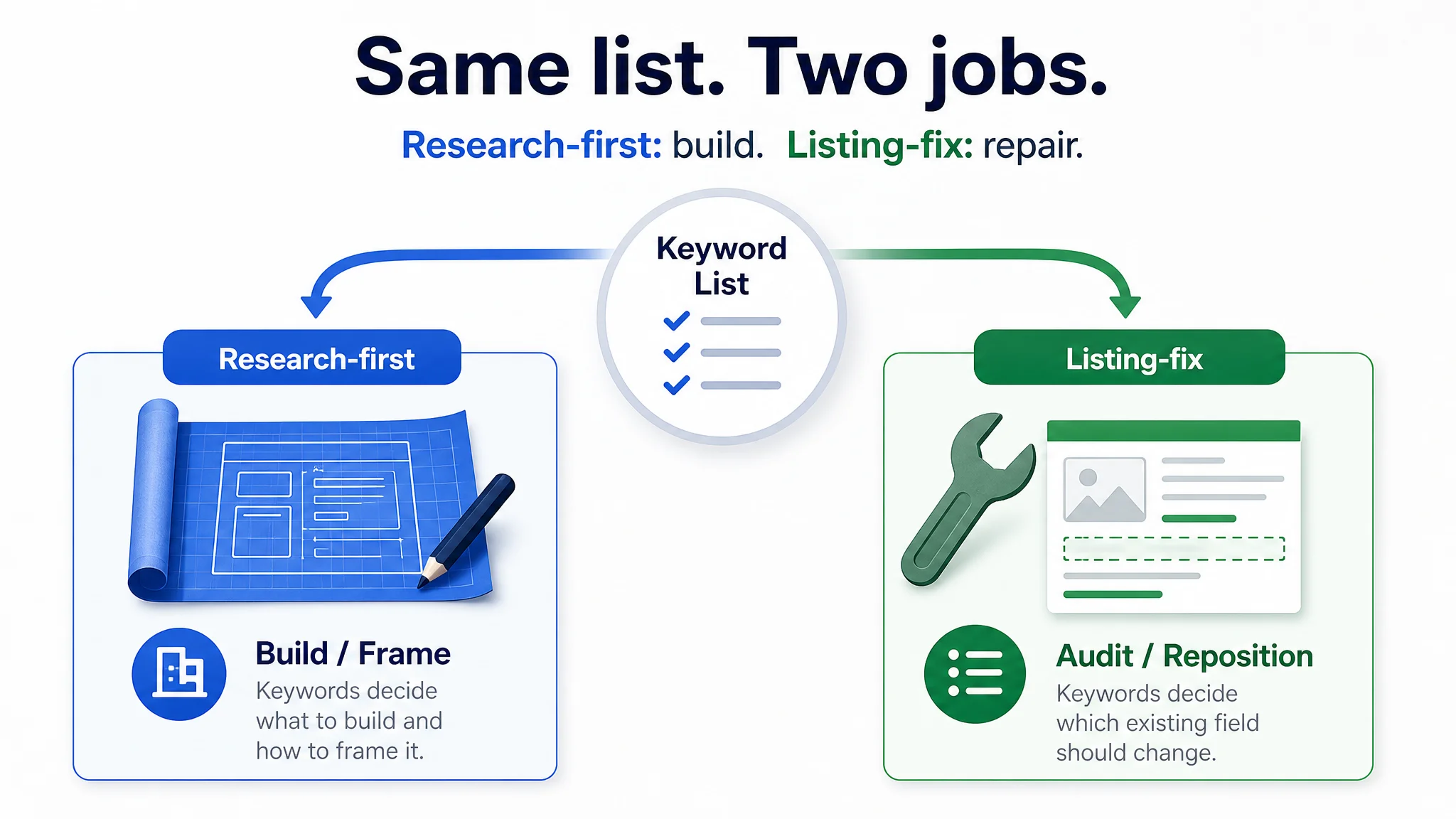
In a research-first workflow, long-tail phrases serve as demand validation before listing creation—for example, “U-neck with Crisscross Back” can confirm a style angle. In a listing-fix workflow, they enter specific fields as conversion modifiers; “fast charging,” for instance, can sharpen an existing title or bullet where the attribute is true.
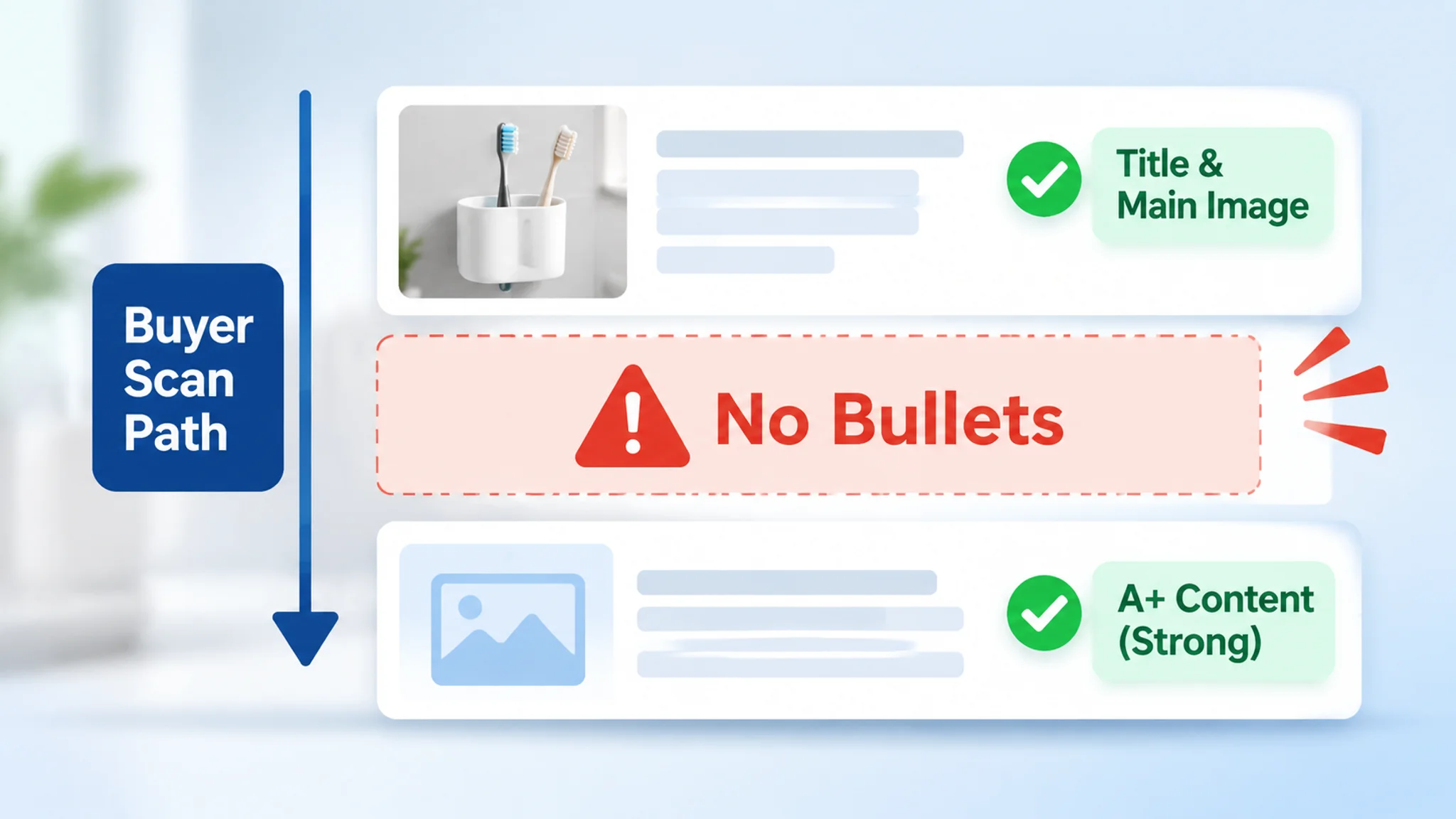
Listing-fix is often where the misdiagnosis starts. One wall-mounted toothbrush-holder seller had a 4.6-star page, a clear main image, and A+ content that was richer than the benchmark competitor’s. Because the visible top and bottom of the page looked acceptable, the team treated unstable ACOS as an ad-console problem and kept adjusting bids, keywords, and budget. The field audit pointed elsewhere: the bullet block was completely missing. The listing had a title and an A+ story, but no mid-page sequence to answer the buyer’s practical questions. In a listing-fix workflow, that is exactly why you audit live fields before assigning more terms or buying more traffic.
Core and Long-Tail Terms on the Demand Curve
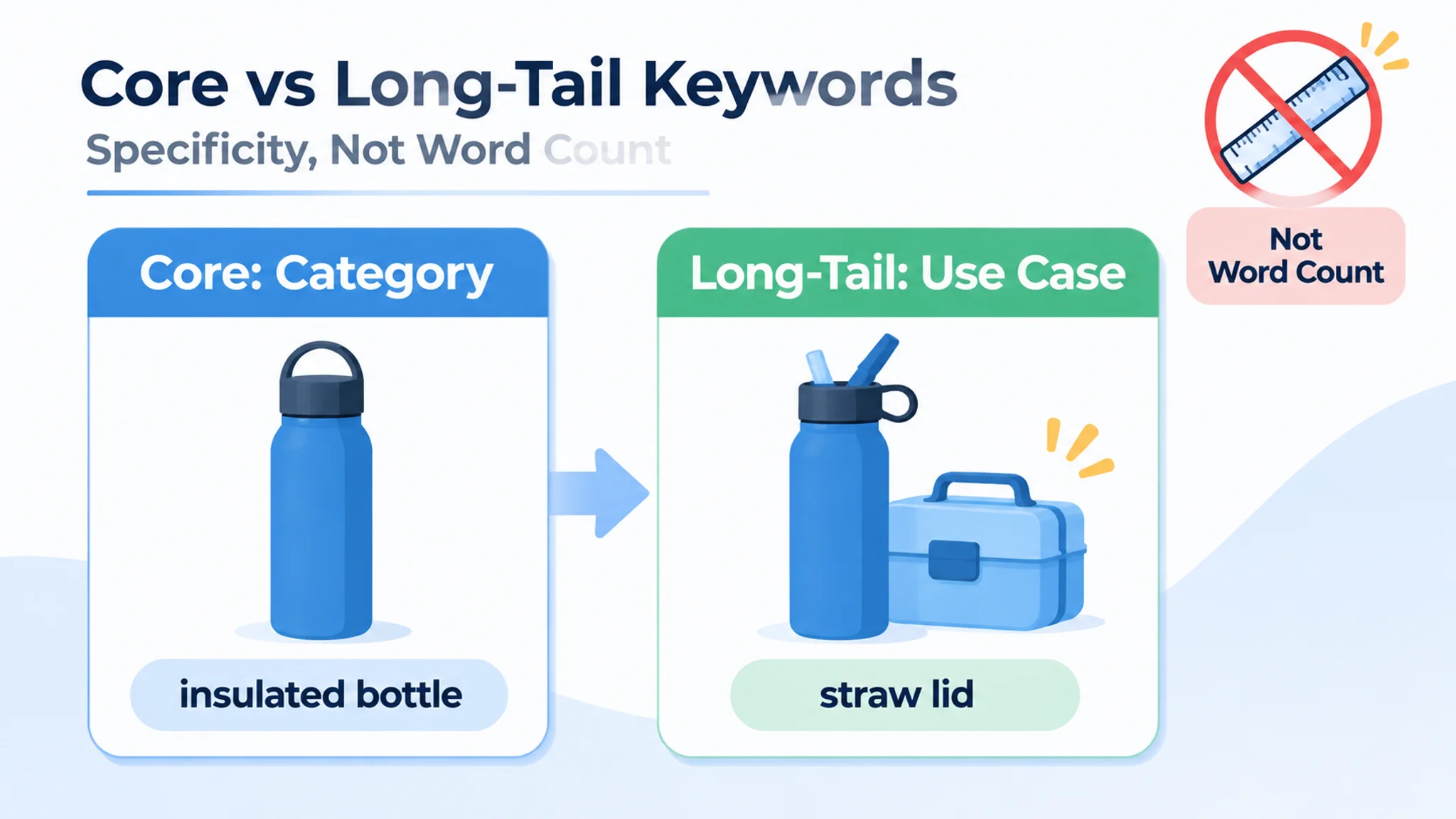
Amazon demand is not a flat keyword list. It is a curve: a crowded head of broad category phrases, then a long tail of specific queries. The head earns visibility but is expensive and contested; the tail earns relevance through precision. Long-tail is not a matter of word count. It is about specificity and intent match—a three-word query can be long-tail if it names a material, size, compatibility, or audience detail.
Core terms carry category identity. They tell Amazon and the shopper what the product is, and they anchor title structure within the 200-character limit. Long-tail terms carry the qualifiers: situation, material, size, compatibility, and audience detail. For illustration only, not measured data, compare “insulated bottle” with “insulated bottle with straw lid for school lunch,” or “phone case” with “phone case with MagSafe compatibility.” The first phrase defines the category; the second narrows the use case.
Long-tail coverage also depends on the field that carries it. In the same bathroom-storage listing, phrases such as self-adhesive, no drilling, 5 slots, family capacity, and toothbrush-head compatibility were not merely extra keywords; they were decision qualifiers that belonged in the visible mid-page structure. The title carried the core category phrase, but without bullets the qualifier set had nowhere to do its conversion work. That is why the demand curve should be read as a placement decision, not just a term-count exercise.
Individual long-tail terms may look modest. Their value is cumulative coverage: many specific queries can lift CTR and CVR when the listing matches them, while broad head terms can inflate ACoS without that match. Treat the curve as a placement decision, then verify with search-term reports.
Where Core Terms Belong: Title and Subtitle
The title carries the most weight in Amazon's visible relevance, so it should hold the terms a buyer would type to find the product category, not every qualifier on your list. Turn that rule into field-level decisions.
- Place core category terms, defining attributes, and the buyer's primary search phrasing in the title; order them brand, core selling point, product form, then supplementary modifiers.
- Move differentiators, audience or use-case modifiers, and size, material, or compatibility details into the subtitle or title extension when they drive the search — and only when product data confirms them.
- Read the title aloud before publishing: if a modifier repeats in every position, delete the duplicate and spend the slot on a term buyers actually type.
- Tabulate three to five competitor listings field by field — core terms in titles, qualifiers in bullets, buyer questions in A+ copy — then flag saturated head terms and visibly missing qualifier phrases.
- Treat competitor listing text as a research lead only; it does not reveal their strategy, ad budget, or profitability, and their brand names stay out of your recommended fields.
- Use DeepBI to score your title and subtitle coverage against high-competitiveness reference ASINs in the same product form, price band, and audience, and read the output as a ranked field-level checklist showing where the score gap is lost.
- Apply the checklist in priority order and re-check CTR and CVR relevance after the edit; benchmark scoring is decision support, not a guaranteed ranking lift.
The title also has to align with the fields below it. The bathroom-storage seller already had “Wall Mounted Toothbrush Holder” in the title, along with material, capacity, and color, so the core category identity was not the main gap. The field-level issue was that high-intent modifiers such as “Self-Adhesive” and “No Drilling” were not fully integrated into the title and were not supported by a bullet section. Once the title was tightened to carry the core phrase and key modifiers while the new bullets explained family capacity, installation, and compatibility, the visible fields began to tell one story. The lesson is not to stuff every qualifier into the title; it is to place core terms where they identify the product and let supporting fields carry the qualifiers that need explanation.
Where Long-Tail Terms Belong: Bullets and A+ Copy
Long-tail terms earn their place where the shopper is already reading for reassurance. Put use-case, audience, size and capacity, material, compatibility, and included-accessory phrases in the bullet block; reserve A+ modules for scenario language and comparison language that helps a shopper picture ownership.
Use a simple placement pattern:
- Bullet → “Will this work for my situation?” → benefit first, then a situational qualifier, then the buyer’s own phrasing (for example, “for small desks,” “fits carry-on,” “works with USB-C laptops”).
- A+ module → “How does this compare with what I have?” → scenario sentence, then a contrast against a common alternative or setup.
Each bullet should lead with the benefit and close with the buyer phrase, not repeat the exact title string. Generic copy lists a number; qualified copy connects that number to a use case. Illustrative rewrite: “10,000mAh battery” becomes “Travel-ready power with a 10,000mAh cell—leave outlet anxiety behind on long days out.” The second version answers a shopper question and keeps the claim tied to a real product attribute.
This is where the bathroom-storage listing was most exposed. The A+ section was visually rich and more developed than the benchmark competitor’s, but the bullet block scored zero. Buyers who scan bullets for a quick answer—Will it hold a family’s toothbrushes? Will it rust? Will it fit my wall without drilling? Does it save space? Will my toothbrush head fit?—had no mid-page roadmap. The page asked them to scroll into A+ and piece the story together, or go back to search results and choose a competitor that explained itself faster. Rebuilding the bullets around family capacity and hygiene, material and design trust, tool-free installation and surface compatibility, compact dimensions, and toothbrush-head compatibility restored the missing decision path. The A+ could then reinforce the promises instead of compensating for absent basics. That is the difference between a long-tail term sitting in a field and a long-tail term doing conversion work.
DeepBI supports this by drafting conversion-oriented bullet and A+ copy from the product’s own attributes, then checking field length, pack-count consistency, and unsupported claims. The operational value is fewer revision cycles and fewer claim mismatches before publishing—not automated ranking.
Completing Coverage: Backend Search Terms
Backend search terms are a residual coverage field, not a disposal bin. Treat the backend as several keyword fields of roughly 50 characters each: a limited total budget. Verify the current field count and character limits in Seller Central before publishing, because platform rules can change.
Use three guardrails. Do not repeat words already covered in the title. Skip unnecessary punctuation, and confirm current syntax expectations in Seller Central rather than assuming either a strict ban or free-form formatting. Never place competitor brand names or trademark terms in backend metadata.
Assign each slot by intent job:
- Synonyms and alternate phrasings
- Common misspellings
- Material and size variants
- Compatibility terms
- Use-case phrases
- Audience phrasing
- Seasonal phrases
Then run the same pattern for every line: coverage job → slot → guardrail → verification step. State the coverage job in your sheet, place the term in the correct field, check it against repetition, punctuation, and trademark rules, then verify the field limit and final text before publishing.
The bathroom-storage seller’s main gap was not backend coverage but visible coverage. Still, the same discipline applies: backend fields should hold synonyms, misspellings, material and size variants, compatibility terms, and use-case phrasing that are not already doing their job in the title or bullets. If a term is decision-critical—such as no-drill installation or toothbrush-head compatibility—it should not be buried only in backend metadata or A+ copy. Backend extends coverage; it does not replace the visible field where the buyer expects the answer.
Reject the sequential-fallback model. Amazon weighs title, subtitle, bullets, description, backend terms, categories, and performance signals together. Backend terms extend coverage; they do not activate only when no exact title match exists. This protects CTR in visible fields while extending query coverage that can support CVR. Keep author names, book titles, and reader-community labels out of metadata; use non-infringing thematic or use-case comparables instead. Named comparables belong in ad research, not backend fields.
DeepBI also enables structured field-level coverage review and one-click synchronization through Amazon SP-API. Review the before/after comparison before applying changes, and inspect the sync status afterward, so each rollout can be reviewed version by version.
Five Seller Profiles and How Each Changes the Split
Your constraint set decides where the line between core and long-tail falls. The five profiles below are operating contexts, not quality tiers.
1. Solo and Small-Catalog Sellers
Your SKU count and research bandwidth are the binding limit. Title space is scarce, so core terms claim it first and long-tail terms earn their way in selectively. Reverse-extract core terms from your own title and bullets, then compare them against one close benchmark per SKU before you rewrite.
2. Agencies Managing Client Listings
Repeatability matters more than per-listing nuance. Build a category or client template instead of one-off term maps, and approve changes field by field so title, bullets, and backend terms can be replaced selectively. Set one review checkpoint before any field-level change goes live.
3. Sellers in More Than One Amazon Marketplace
Language, currency, timezone, and site ranking all shift, so a term that clears the bar on one site may not rank on another. Validate core and long-tail terms per marketplace. Keep a site-specific term bank and re-run benchmark searches in each target site.
4. Sellers Launching or Relaunching a Listing
You have little or no reliable historical CTR or CVR to weight terms with. The first split leans on benchmark competitors and category-node top sellers: primary core terms go where title structure allows, while pain-point long-tail phrases route into bullet logic. Build that first map from competitor keyword extraction, top-seller review, and confirmed product specs.
5. Teams Working Through an AI Assistant
Assistant output has to be structured and bounded to be usable. It can draft a core and long-tail allocation from ad reports, competitor terms, and product constraints, but placement still needs human approval. Hand it a prioritized term list, field character limits, and hard no-invention rules, and flag low-evidence long-tail terms for testing rather than automatic placement.
Read together, the five profiles move the same decision in different directions: small catalogs push weight toward core terms, agencies standardize the split across listings, multi-marketplace sellers duplicate it per site, launches borrow it from benchmarks, and AI-assisted teams draft it under human sign-off.
Layout Mistakes That Quietly Waste Fields
Field waste is quiet: a term looks present but adds no new traffic or clarity. DeepBI can flag thin or duplicated field coverage as a diagnosis input; the operator still decides placement.
The bathroom-storage listing is a stark example of field waste that was not visible in a quick page review. The title had the core phrase, the main image was functionally clear, ratings were 4.6 stars, and the A+ content was stronger than the benchmark competitor’s. Yet the bullet points scored zero against a benchmark that used all five bullets to answer family capacity, material and design, no-drill installation, space saving, and compatibility. The page looked “already good enough” at the top and bottom, but the middle—the field buyers scan for a quick decision summary—was empty. That is quiet waste: not a duplicated word, but an absent field that forced every click to work harder. The fix was not to beautify the A+ further; it was to surface decision-critical qualifiers in the visible fields where buyers expect them.
- Head terms duplicated across title, bullets, and backend fields → repetition spends character budget and backend slots without adding indexed coverage → keep the head term in the title, use qualified variants in bullets, and reserve backend for unindexed terms → verify each backend term is absent from visible copy.
- Competitor brand names or model numbers placed in backend metadata → these terms describe another product and waste slots that should hold your own variants → remove them and use your brand, model, and true identifiers → verify no third-party name remains in the backend file.
- Single generic nouns used without any situational modifier → a broad noun gives the algorithm little context and can weaken CTR and CVR in crowded results → pair it with a true use case, compatibility, size, or material qualifier in title or bullets → verify every generic noun has a factual modifier.
- Material, dimension, or compatibility qualifiers buried only in A+ copy → A+ does not substitute for search relevance or purchase confidence in the title and bullets → surface decision-critical qualifiers in title and bullets; use A+ for expansion → verify each qualifier appears in a searchable field.
- Treating low result counts or low review counts as proof of a winnable niche → these are rough directional signals, not standalone evidence → confirm with BSR patterns, review velocity, ad competition, and a second data source before placing terms → verify the operator signs off on the gap.
Measure, Maintain, and Re-Check
Treat the placement map as a live operating document, not a one-time launch artifact.
Record every decision in a lightweight tracking sheet with four columns:
- Field
- Term
- Last updated
- Observed ranking or session notes
Log title, bullet, and backend search-term changes on separate rows so you can see which placement actually moved. Put a report ID or event note in the session-notes column when a change comes from an ad-data review.
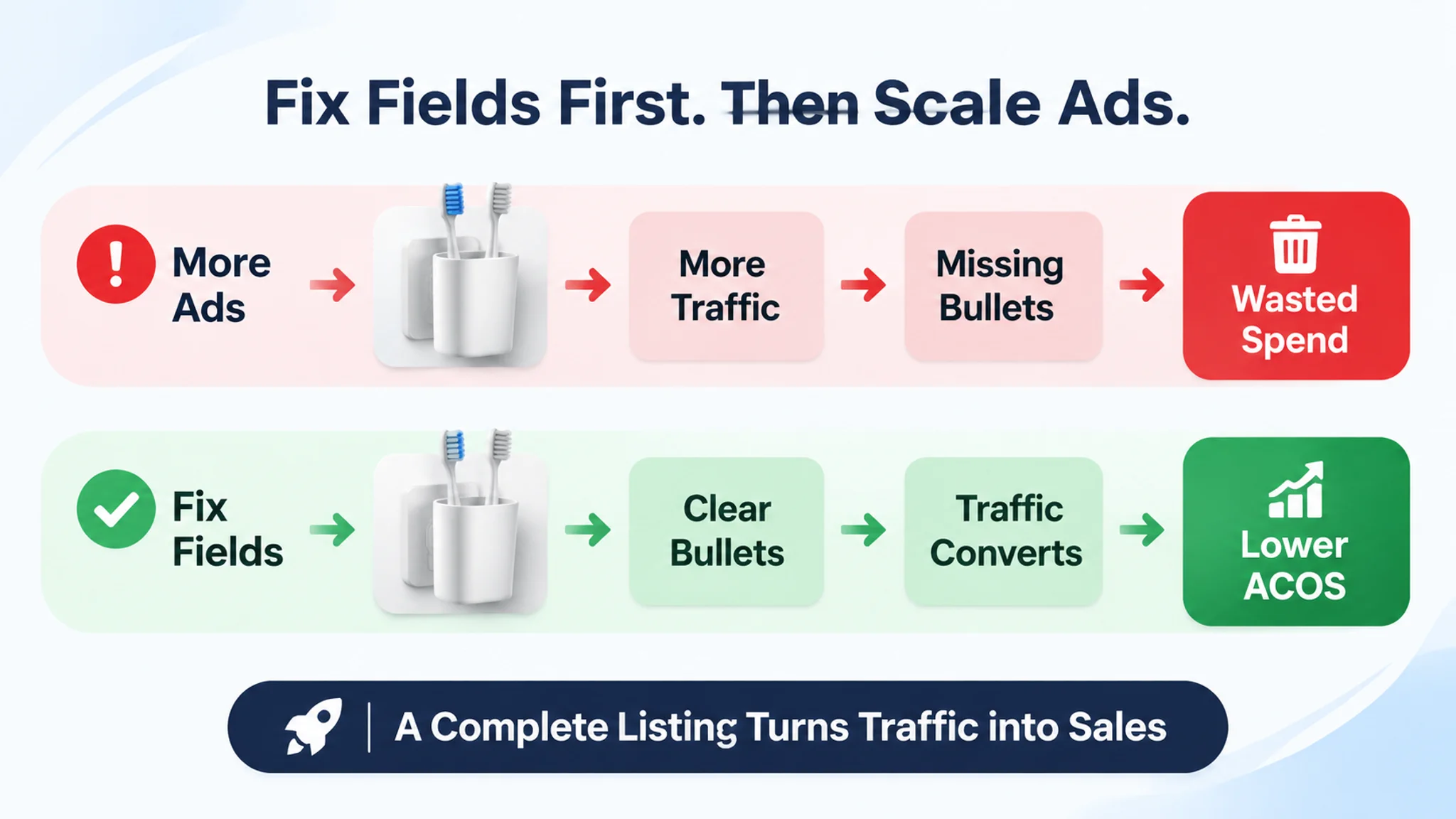
When the bathroom-storage seller rebuilt the bullet architecture and aligned the title and main-image narrative with it, the point was not to claim a single-field miracle. The more useful operating lesson was that ad traffic stopped being asked to compensate for an incomplete page. ACOS had room to compress because more paid traffic could convert, and the listing could better convert organic visitors as well. That is why the tracking sheet should log title, bullet, and backend changes on separate rows and compare old and new field states. A rank snapshot alone cannot tell you whether the field change was justified; the before/after field state and the CTR/CVR response can.
Re-check on a cadence. Schedule a full review roughly every 90 days, then add event-driven refreshes before peak season and after any material, packaging, or compatibility change. At each review, re-verify field limits, category conventions, and search behavior. Treat this guidance as a 2026 baseline; do not assume those constraints are stable.
When long-tail placement correlates with stronger ranking, treat it as a working heuristic, not proof. Other factors likely contribute, and one seller's result is an illustrative case, not a typical outcome. Decide whether a change was justified by comparing the old and new field state, not by a single rank snapshot.
For organic placement in DeepBI, promote high-CTR and high-conversion terms surfaced from advertising data into visible and backend fields. Reinforce your strongest terms so short-term paid visibility and longer-term organic rank move together. Measure with TACOS and organic order share rather than a single keyword rank.
Terms that prove conversion in the layout can later be handed to Sponsored Products keyword targeting.
FAQ
What does core and long-tail layout mean?
It assigns each keyword a job. Core terms carry main demand; long-tail terms qualify intent. The map sets placement, not word count.
How many core terms should a title carry?
There is no fixed count. Use as few primary terms as needed to state the product and main use. Let the 200-character limit cap the title; cut duplicates first.
Do long-tail terms belong in backend only?
No. Backend fields extend coverage; they are not an exact-match fallback. In the bathroom-storage listing, the most important qualifiers—family capacity, no-drill installation, space saving, and toothbrush-head compatibility—needed to appear in the visible bullet path before backend coverage could help. Put clarifying long-tail phrasing in bullets and awkward variants in backend.
How should I compare a competitor’s visible field map?
Read visible fields as leads, not strategy. Compare repeated qualifiers across title, bullets, and A+ text. You cannot see their ad budget or profit, so test the pattern yourself.
Is a free or low-cost research path workable?
Yes, with cross-checking. Use autocomplete in clean sessions, then confirm a term on a second surface. Record the source and marketplace; single-source volume is weak.
How does DeepBI fit the layout workflow?
DeepBI is Amazon-only and listing-led. It diagnoses the listing, extracts core search terms from title and bullets, and turns stable ad signals into organic reinforcement. It informs layout; it does not replace brand or compliance judgment.