


Why AI-Generated Images Demand a Fresh Compliance Mindset
AI image compliance on Amazon is no longer limited to checking whether a picture looks attractive. Sellers must also establish whether the image accurately represents the product, follows Amazon’s image requirements, and has been properly identified when generative AI was used.
As of August 7, 2026, Amazon’s official Seller Central guidance requires sellers to accurately declare whether product content was generated by generative AI when Amazon’s listing tools request that information. The declaration obligation is not limited to images created entirely from a text prompt. A seller should review the workflow carefully when AI changes an original product photo, replaces a background, alters lighting, creates a lifestyle scene, or generates a new composition around the product. The boundary between “AI-assisted” and “AI-generated” can be difficult to define operationally, so treating the declaration as a compliance checkpoint is safer than assuming minor edits do not count.
Accuracy creates a second risk. General-purpose image tools may alter a product’s shape, materials, color, proportions, logo, included accessories, or apparent use. If shoppers receive something different from what the image suggests, the result could include lower trust, negative reviews, refunds, and after-sales disputes. Those outcomes are not inevitable, but unchecked visual distortion can weaken CVR and create performance pressure even when the image initially increases CTR.
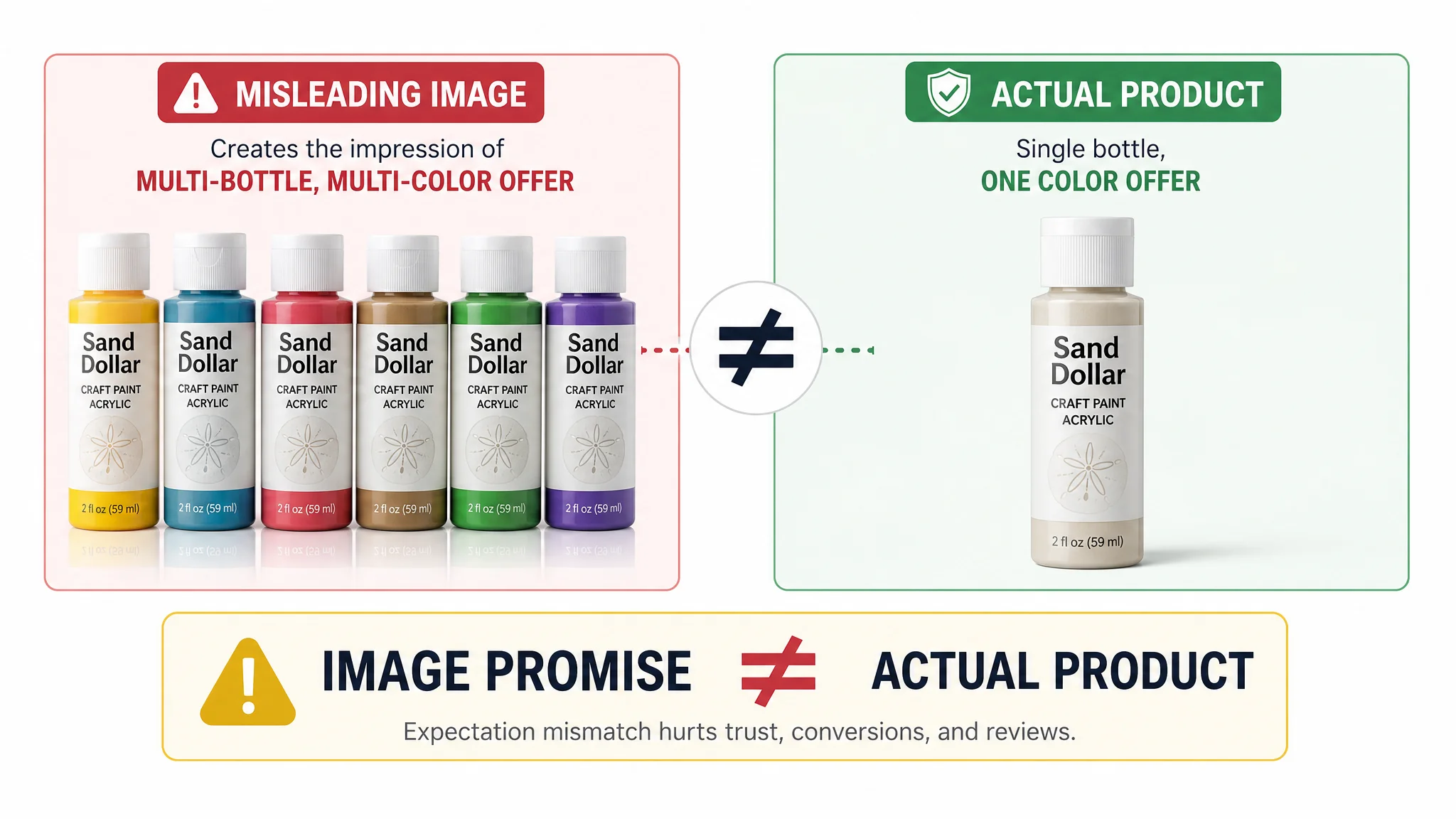
A craft-paint Listing illustrates how quickly a visual mismatch can become a conversion problem. The offer was for one 2 oz Sand Dollar paint bottle, but a secondary image showed six bottles in different colors. A shopper could reasonably interpret the image as a multi-pack or a multi-color offer. The issue was not simply that the image looked inaccurate; it created a gap between what the Listing appeared to promise and what the customer would actually receive. That kind of gap can create hesitation before purchase and dissatisfaction after delivery.
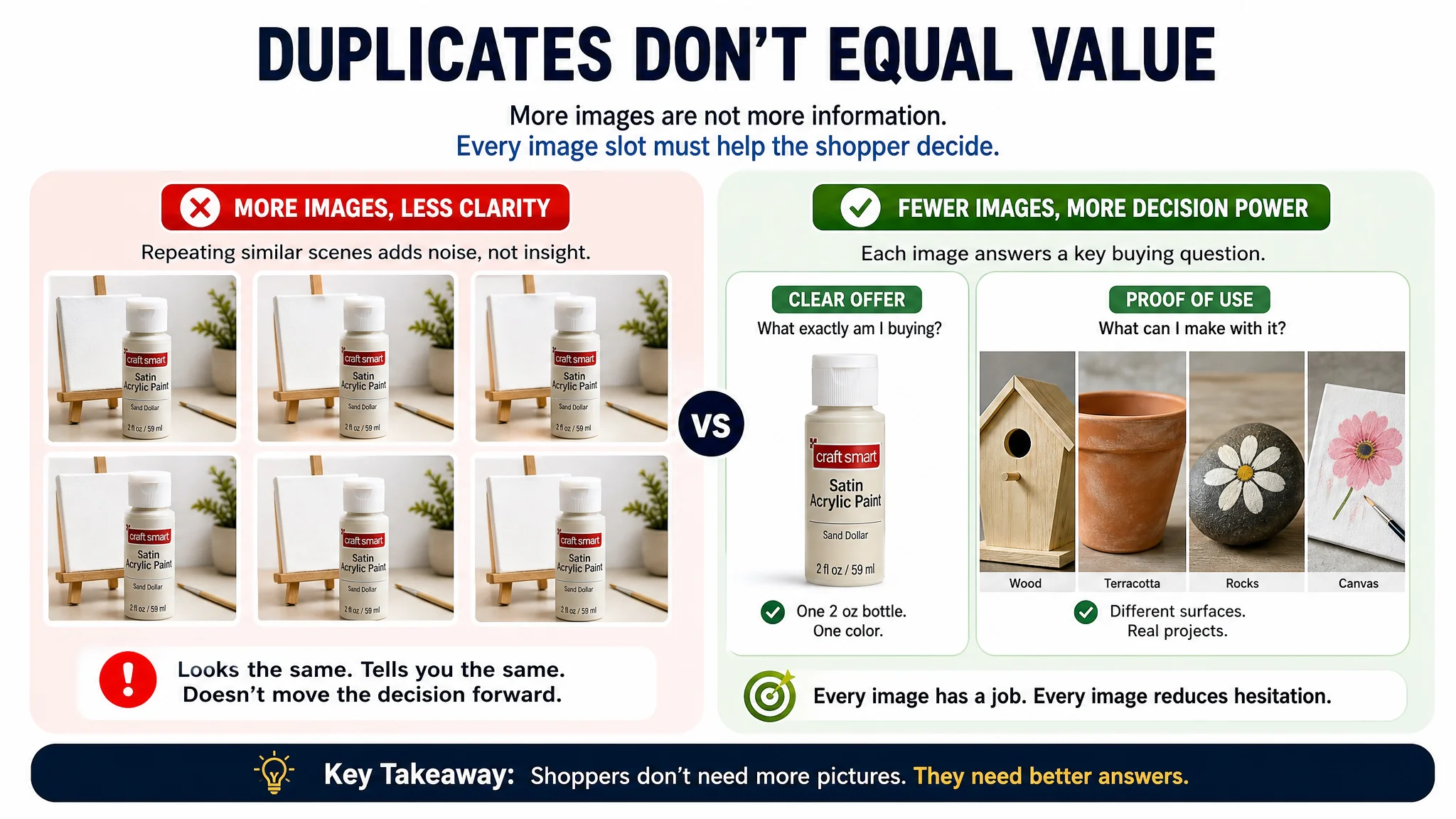
The same Listing also showed why visual accuracy cannot be separated from visual completeness. Its main-image score was relatively close to that of a category-leading competitor, but the page still struggled because the images did not clearly prove multi-surface use. The competitor showed paint applied to wood, birdhouses, rocks, and other craft surfaces, while the seller relied more heavily on repeated, generic canvas scenes. The problem was therefore not only whether the images were technically acceptable. They were also failing to answer the shopper’s practical question: “What can I actually make with this product?”
Some sellers also report that AI-generated or AI-edited images may receive additional scrutiny, or that Listings using them may face suppression or reduced visibility. Amazon has not publicly confirmed a universal AI-image scanning policy based on these anecdotal reports. Sellers should therefore treat such experiences as signals to investigate, not as established enforcement rules. Compliance review cannot guarantee protection from suppression or performance problems, but it can reduce avoidable risk.
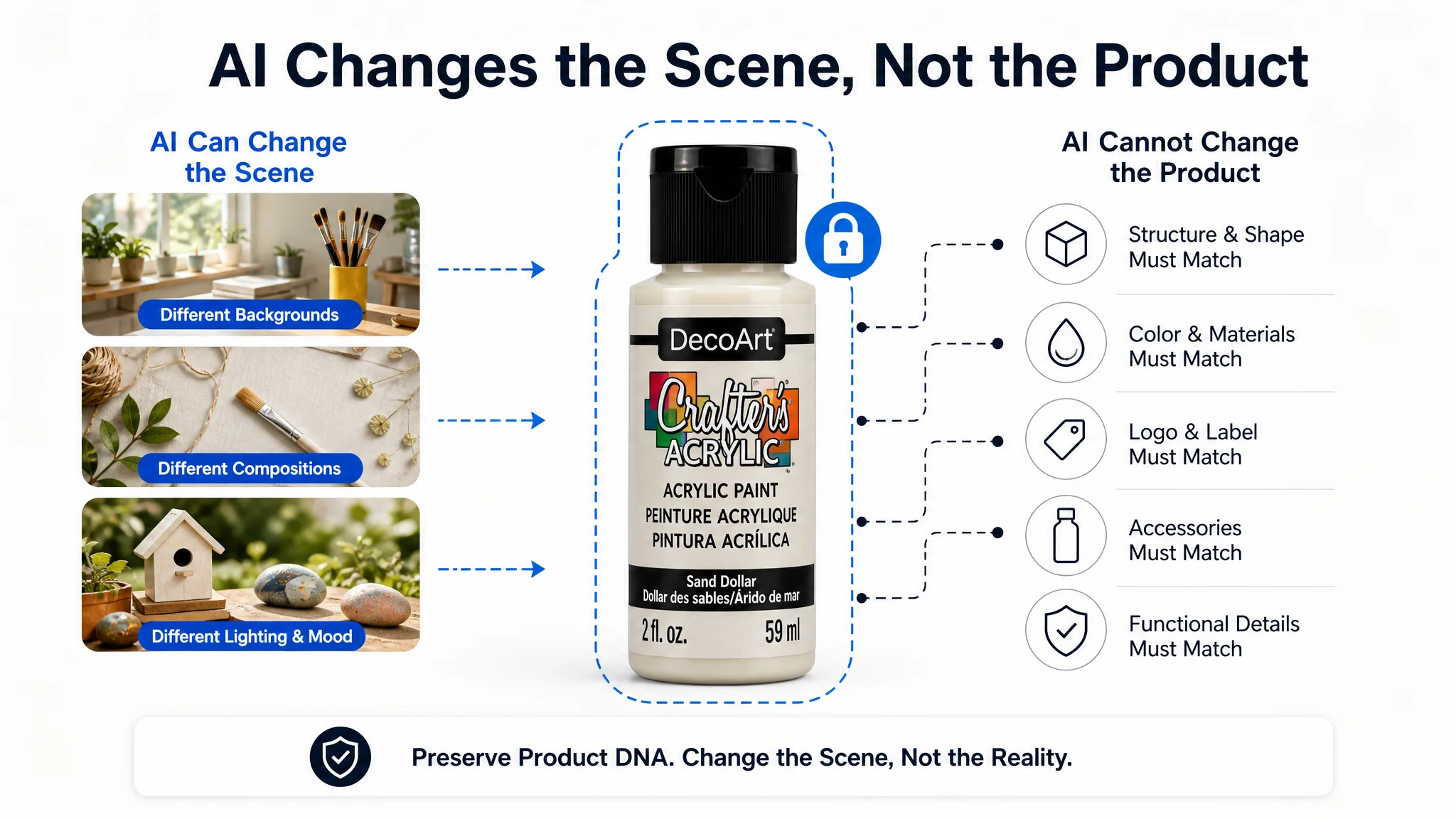
A safer production model treats AI as an execution system rather than an unrestricted creative tool. Product DNA and original assets should define the factual boundary, while generation handles controlled changes to approved visual elements. Before publication, compare each output against the actual product and review the original and replacement image side by side. Human approval remains essential because the seller—not the image model—owns the final decision affecting Listing accuracy, customer expectations, and Amazon compliance.
Amazon Image Requirements: How to Ensure Amazon Compliance in 2025
Amazon image rules combine measurable technical specifications with category-specific presentation standards. Because thresholds, accepted formats, image-slot rules, and category policies can change, treat the checklist below as a verification workflow—not a permanent rulebook. As of this writing, confirm every uncertain specification in the latest Seller Central or Amazon Help documentation before upload.
Main Image Specifications
- Confirm the current minimum pixel dimensions for the product category and Listing type; if Amazon’s present requirement is unclear, verify the latest Seller Central documentation rather than relying on an older checklist.
- Check whether the image must support zoom and whether Amazon currently references a 1600-pixel edge for that capability; do not treat 1600 pixels as a universal or permanent requirement without confirming the current official guidance.
- Verify whether the main image requires a pure white background, including the specified RGB 255, 255, 255 treatment, before submission.
- Ensure the product is the dominant subject and that the image satisfies Amazon’s current product-coverage and visibility rules for the relevant category.
- Confirm the accepted file format, color mode, file-size limits, and aspect-ratio requirements in current Seller Central documentation. Do not assume that a format accepted on one Listing or marketplace remains accepted everywhere.
- Compare the generated image with the physical product before upload. Check structure, proportions, materials, logo placement, functional details, included accessories, and other product attributes to prevent product-image mismatch, refunds, and negative reviews.
- Run a pre-upload technical validation and retain a human approval step before replacing an existing Listing image.
Technical compliance, however, does not automatically make an image commercially effective. In the craft-paint example, the main images were scored 24 out of 30, compared with 25 out of 30 for the competitor. That relatively small gap could have encouraged the team to focus elsewhere, but one secondary image still created a serious trust risk by showing multiple bottles and colors for a single-bottle offer.
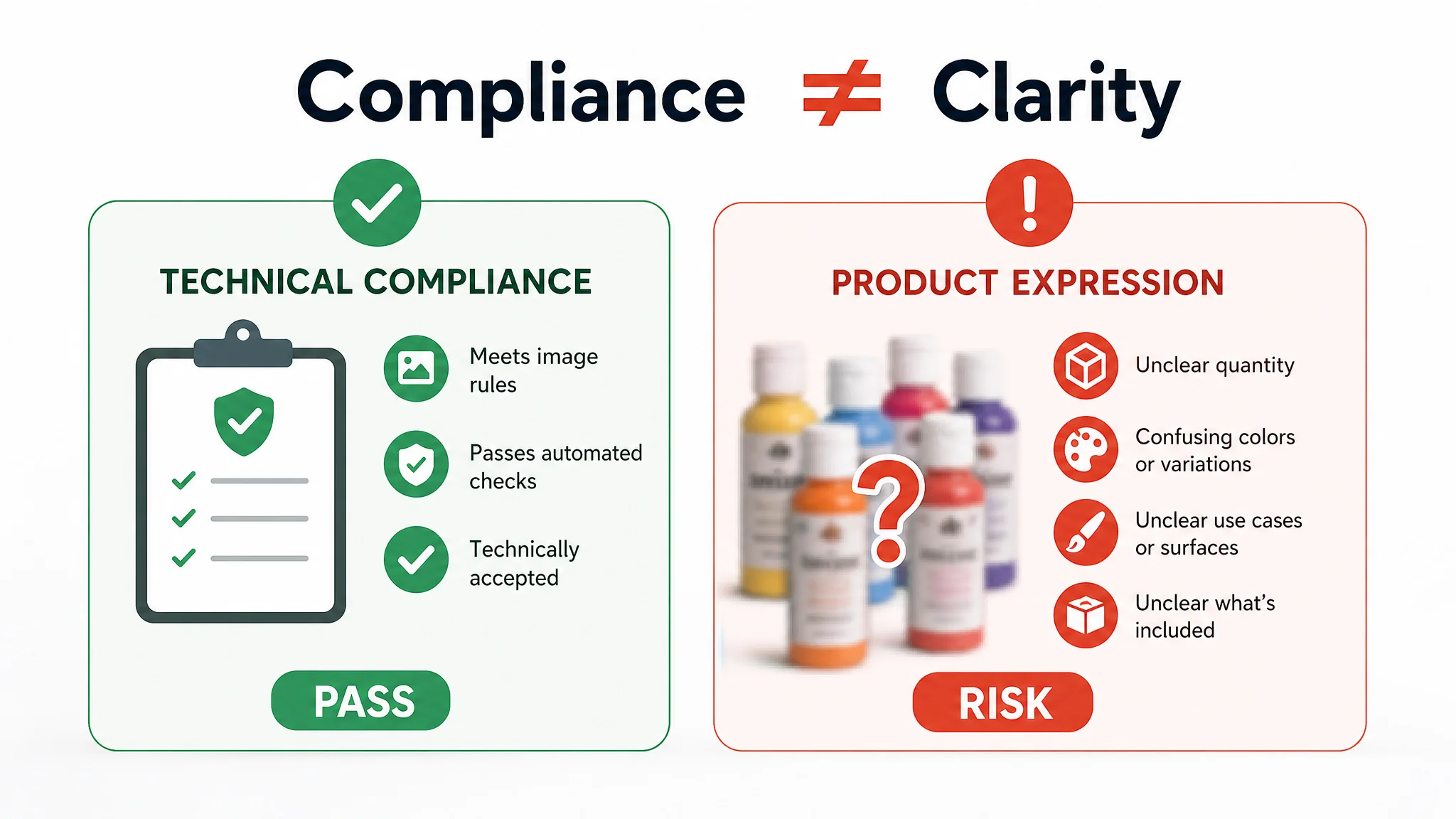
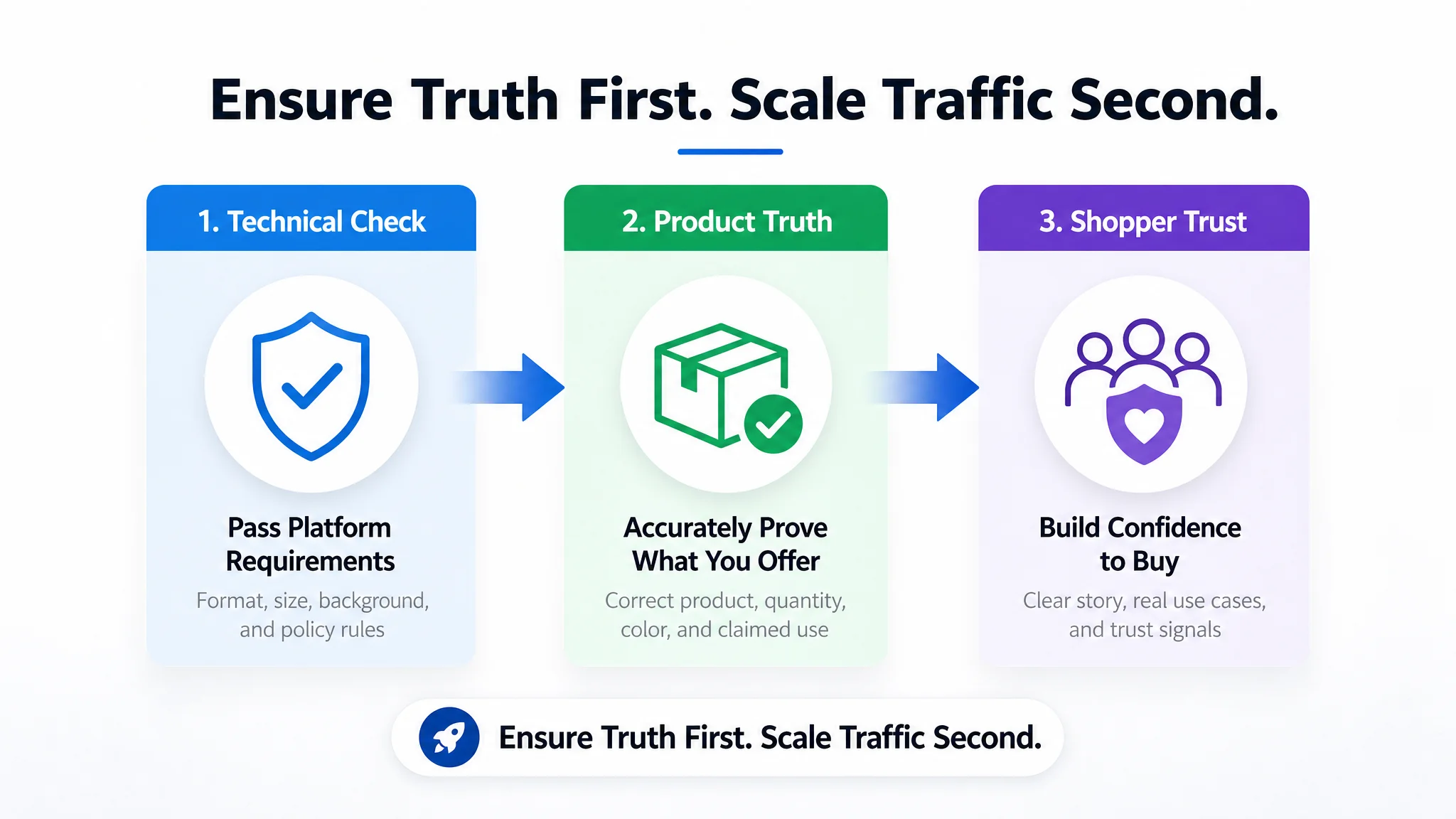
This distinction matters when reviewing image performance. A file can satisfy basic technical requirements while still confusing shoppers about quantity, color, use case, or included components. A proper review must therefore ask two separate questions:
1. Does the image meet Amazon’s applicable technical and placement requirements?
2. Does the image accurately and clearly represent the offer?
A “yes” to the first question does not guarantee a “yes” to the second.
Additional Image Guidelines
- Map every image to its intended placement: main image, additional image slot, or A+ content module; each placement may have different rules.
- Use lifestyle images only when they accurately represent the product and do not introduce unsupported features, accessories, claims, or usage conditions.
- Review infographics for readable text, accurate dimensions, authentic specifications, and compliance with the current category and marketplace requirements.
- Treat video thumbnails as a separate compliance item and verify their current image, text, branding, and format rules before publishing.
- For shoes, verify whether Amazon requires particular views, including relevant sole, side, or top angles; category rules must be checked in the latest Seller Central documentation.
- For apparel, confirm current requirements for model presentation, garment visibility, color accuracy, and required views rather than applying rules from another category.
- For jewelry, verify any current requirements for scale, detail visibility, material representation, and category-specific angles.
- After upload, monitor Amazon’s processing status and resolve any pending or policy-rejected image before evaluating effects on CTR, CVR, ACoS, or BSR.
The image set should also be evaluated as a communication system. For a product that claims multi-surface use, repeating similar scenes on canvas may leave the central benefit unproven. In the craft-paint Listing, the competitor used images of wood, terracotta, rocks, and other objects to demonstrate variety in application. The seller’s images were more generic and offered less visual evidence of what “multi-surface” meant in practice.
That comparison does not mean every Listing should copy a competitor’s imagery. It shows that an image slot should have a defined job. If the product benefit is versatility, the visual system should demonstrate that versatility. If the product promise is a particular finish, the images should show finished objects where that finish can be understood. Compliance and conversion work together when the images remain accurate while answering real purchase questions.
3 Common Amazon Product Image Mistakes (And How to Fix Them)
Visual gaps rarely look serious during upload, but shoppers use images to answer practical questions before they buy. If the product cannot be understood quickly, CTR, CVR, trust, and possibly Listing health may suffer. These outcomes are not automatic, and image changes do not conclusively determine ranking. They are signals to diagnose and validate rather than assumptions to treat as proof.
1. Not Having Enough Photos
A single main image cannot show every detail a shopper needs. Missing views, dimensions, feature explanations, or real-use scenes can leave objections unresolved and shorten meaningful engagement with the Listing. That may weaken conversion, especially when shoppers need to compare size, construction, included components, or usage context.
The correction is not simply to add repetitive images until every slot is filled. Audit the main image, supporting slots, and A+ content as one visual system. Assign each asset a clear job:
- Show the product clearly and attract the click.
- Explain a feature or dimension.
- Demonstrate an appropriate use scene.
- Resolve a likely purchase concern.
- Reinforce trust through accurate detail.
Replace missing information first. A varied, high-quality image set gives shoppers more reasons to continue evaluating the product and provides a stronger basis for CVR testing.
The craft-paint Listing demonstrates why “more images” is not the same as “better information.” The seller had a usable main-image set, but it did not provide enough evidence of the product’s broader application. Several images repeated canvas-based scenarios, while the leading competitor showed different surfaces and more advanced projects. The missing element was not necessarily another product shot. It was visual proof that connected the product claim to a believable outcome.
A stronger image plan would use one slot to show multiple legitimate surfaces, another to show a more complex craft project, and another to clarify the single-bottle offer. This gives each image a distinct role while reducing both information gaps and expectation mismatch. The underlying principle is simple: image quantity matters only when each asset helps the shopper make a decision.
2. Failing to Treat Product Photos as Part of Your SEO Strategy
Images are not separate from Listing communication. File names and image text fields, where applicable, should use relevant language appropriately, while infographics should make important benefits and specifications easy to understand. Visual content can support discoverability and shopper comprehension, but it should never become a place to stuff keywords or make unsupported claims.
Start with Listing data, customer language, and high-value search terms. Then decide which product benefit deserves visual emphasis and give each image one communication purpose. For example, an infographic can translate a verified specification into a concise visual explanation rather than adding decorative copy.
Use performance data to evaluate the change. A new visual may influence CTR or CVR, but the effect should be measured against the relevant ASIN and broader Listing conditions. If an image update is linked to advertising reporting, treat that connection as a feedback loop—not conclusive proof that the image alone caused the result.
A seller in the acrylic craft-paint category initially believed that stronger keywords and a richer title would solve weak sales. The team adjusted wording toward terms such as “Premium Matte Finish” and “DIY Arts and Crafts,” assuming that more relevant traffic would eventually improve performance. However, benchmarking found that the seller’s title was not the primary weakness. Its raw title score was actually higher than the competitor’s, while the larger gaps appeared in A+ content, reviews, and the overall conversion story.
This does not make image language or Listing keywords unimportant. It shows why they must be evaluated in context. Better discoverability can bring more shoppers to a page, but it cannot compensate for a page that does not explain the product, prove its use cases, or establish trust after the click. Search optimization should therefore be connected to the full customer decision path rather than treated as a substitute for it.
3. Using Unrealistic Images
AI-generated imagery is not automatically harmful or noncompliant. The risk appears when an image changes the product’s structure, proportions, materials, logo placement, color, accessories, or functional details. A polished image that misrepresents what arrives can damage trust, increase negative reviews or refunds, and create authenticity concerns.
Before generation, establish the product’s physical identity from original references and confirmed specifications. After generation, compare every image against those references. Reject or locally correct any image that invents a feature, adds an accessory, exaggerates size, or alters a component. Use AI for composition, lighting, background, angle, or scene improvements while preserving the product itself. Declare AI-generated elements when Amazon’s applicable requirements call for it, and complete a human review before upload.
The misleading secondary image in the craft-paint Listing was a practical example of this risk. The actual offer was one Sand Dollar bottle, yet the image displayed six bottles in multiple colors. Even if the image was visually polished, it implied a different quantity and assortment. The correct response was not to improve the design around the image. It was to fix or remove the asset and show only the legitimate single-bottle offer, including only valid packaging variations for that color if necessary.
The same review also identified a second form of visual weakness: generic scenes that did not substantiate the product’s stated use. An image can be factually accurate in isolation and still fail to communicate the product’s real capability. For that reason, the review should check both literal accuracy and evidentiary value. The image must show what the customer will receive and provide credible support for the benefits the Listing presents.
Your AI Image Compliance Risk Checklist & Human-Review Workflow
Treat image review as a risk-reduction control, not a compliance guarantee. Automated checks can catch technical failures, but human judgment and current Amazon policy verification remain necessary before publication.
- Step 1 — Run an optional automated pre-upload scan: Check file format, color mode, image dimensions, and other available technical requirements before the images enter the Listing workflow.
- Check every main image against the applicable background rule: Where Amazon requires a pure white background, confirm that the background is RGB 255, 255, 255 rather than an off-white, gradient, shadowed, or digitally altered substitute.
- Verify minimum resolution for each image: Compare every file with the applicable Amazon image specification, including minimum pixel dimensions, before upload. Do not assume that one compliant image means the entire image set is compliant.
- Confirm AI-generated image disclosure requirements: Review Amazon’s current AI-image declaration tool and policy documentation, then declare generated content through the required process when applicable. Do not infer the requirement from an image generator or internal workflow.
- Step 2 — Complete a manual visual review: Inspect the product’s structure, proportions, materials, logo placement, functional openings, included accessories, and visible features against the original product and confirmed specifications.
- Check for product-image mismatch: Reject any image in which AI has invented an accessory, changed the product’s physical design, exaggerated its proportions, or implied a function the product does not provide. Product truth must outrank styling or competitor references.
- Validate every lifestyle scene: Confirm that the product, usage context, accessories, and visible results accurately represent the real offer. A visually attractive scene that suggests a nonexistent use case can increase refund and negative-review risk and weaken CVR.
- Review infographic copy line by line: Validate dimensions, weight, materials, performance values, interfaces, features, and outcome claims against confirmed product facts. Remove unsupported or exaggerated statements.
- Use optional product-truth controls where available: A structured product reference such as Product DNA can constrain generation and help compare output with the real product, but it does not replace human approval.
- Step 3 — Cross-reference official requirements before upload: Recheck the current Amazon image, category, and AI-content policies, including rules that may change by marketplace or product type.
- Record the reviewer’s decision and unresolved questions: Hold any uncertain image for human clarification rather than allowing AI to fill gaps with invented facts. This additional checkpoint may prevent Listing delays, weaker CVR, higher ACoS, or avoidable post-sale risk, but no checklist can guarantee compliance.
The manual review should also consider the relationship between images and the rest of the Listing. In the craft-paint case, the team initially focused on keywords and advertising because sales were weak. A broader review showed that the page had a 0 out of 25 score for A+ or detail content, very limited review proof, and a confusing image. The problem could not be identified reliably by checking image resolution or background color alone.
A useful workflow therefore asks:
- Is the offer shown accurately?
- Does each image support a real product claim?
- Does the image answer a likely shopper concern?
- Does the rest of the Listing provide the information and trust that the image begins to establish?
- Would additional traffic expose a stronger page or simply amplify an existing weakness?
This is why visual compliance review should be connected to conversion diagnosis. An image may pass technical checks while the Listing still lacks the capacity to convert the traffic it receives.
Leveraging DeepBI for Ongoing Image Compliance Monitoring
DeepBI can provide a practical monitoring layer for Amazon sellers managing multiple SKUs, while final compliance decisions remain with the seller.
- Use DeepBI as an Amazon Listing-focused compliance-assistance tool, not as a replacement for reviewing Amazon’s current official image requirements.
- Connect your catalog so DeepBI can analyze the image assets associated with existing Amazon Listings and surface potential weaknesses before they affect visibility, conversion, or Listing availability.
- Run DeepBI image scans against known Amazon technical standards, including checks related to background presentation, image quality, and required main-image elements.
- Review DeepBI alerts for potentially off-white backgrounds, since a main image that does not satisfy Amazon’s required white-background presentation may be blocked or require correction.
- Investigate DeepBI low-resolution warnings and confirm the file dimensions against Amazon’s current requirements; the documented Listing workflow references a minimum 1600-pixel edge for applicable images.
- Check DeepBI findings for missing main-image requirements, then verify that the primary image clearly presents the product and follows the relevant Amazon format rules.
- When your catalog is connected, review DeepBI alerts for potentially missing AI-generation declarations. These alerts reference Amazon’s published guidelines and should be treated as prompts for verification, not final legal or policy determinations.
- Use DeepBI findings to prioritize corrections across a large catalog, helping reduce manual review time and shorten Listing cycle time before a peak-season update.
- Confirm every flagged issue against the latest official Amazon guidance before changing or publishing an image, because automated or structured detection can identify potential risks without guaranteeing that a Listing is compliant.
- Perform human verification after each correction, checking the actual image file, the Listing context, and any required disclosure before submission.
- Keep the monitoring scope Amazon-specific: the described DeepBI checks are designed for Amazon Listings and do not provide compliance coverage for other marketplaces.
- Do not treat a clean DeepBI result as a guarantee against suppression, rejection, or future policy action; use it as evidence to support a documented review checklist and seller accountability.
DeepBI can also be useful when the issue is not a single technical defect but a broader Listing diagnosis. In the craft-paint example, benchmarking did not simply identify that one image was confusing. It compared the Listing across title, main images, bullet points, A+ content, and reviews. The result showed that the title and main-image scores were relatively competitive, while A+ content scored 0 out of 25 and the review base was substantially weaker than the benchmark.
That diagnosis changed the recommended sequence. The seller had viewed weak sales and rising advertising costs as evidence that keywords or ad targeting needed improvement. The comparison showed that the Listing’s deeper constraint was conversion capacity. More traffic would not solve the absence of a product story, visual proof of multi-surface use, or sufficient trust signals.
This is an important boundary for monitoring tools. Detection can surface potential compliance and content weaknesses, but it does not replace commercial judgment. Sellers still need to determine whether an image accurately represents the offer, whether the page answers the shopper’s decision questions, and whether the Listing is ready to receive additional paid traffic.
Future-Proof Your Amazon Visual Strategy
Amazon visual compliance is moving beyond basic file validation. Sellers must now control both technical quality and AI-related authenticity risks, because an attractive image that misrepresents the product can damage CVR, trigger refunds, and weaken customer trust.
- Verify Amazon’s current technical specifications before every upload or revision: check white-background proportions, RGB color mode, image dimensions, and the required minimum 1,600-pixel edge rather than relying on an older Listing template or saved workflow.
- Audit every Listing for the three recurring AI image mistakes: altered product structure or proportions, invented features, materials, components, dimensions, or performance claims, and technical errors involving image format, color mode, background, or placement.
- Compare each generated or replacement image with the actual product before publishing: confirm the logo, brand colors, materials, functional openings, component positions, proportions, and visible claims remain accurate. AI should support execution, not override human judgment.
- Use a human pre-upload checklist: confirm that the image shows the item customers will receive, validate every claim against the product information, check technical specifications, and compare the replacement asset with the original image before applying it to the Listing.
- Treat DeepBI or similar systems as supplemental assistance, not a substitute for review: DeepBI can support DNA consistency checks, compliance detection, detail scanning, and user-controlled image selection. Its workflow is designed to help identify risks and organize visual production; sellers still decide which asset is suitable for publication.
- Recheck live Amazon requirements and processing results after submission: automated validation only covers configured rules and cannot replace monitoring for policy changes. Track later Listing and advertising signals such as CTR, CVR, ACoS, BSR, and Listing cycle time when evaluating whether a visual revision delivered useful business value.
- Make visual compliance part of ongoing Listing maintenance: remove any asset that introduces a product mismatch, unsupported claim, or technical defect, and review future updates with the same discipline rather than assuming one approval will remain valid indefinitely.
The craft-paint Listing shows why this discipline must extend beyond isolated image edits. The seller initially assumed that stronger keywords, a better title, or more advertising would address weak sales. Benchmarking revealed that the title was not the main leak, while the page lacked A+ content, had limited review support, and included an image that could misrepresent the quantity and color offer. The competitor was not simply attracting more shoppers; it was giving those shoppers more reasons to trust and understand the product.
That distinction is central to visual strategy. Advertising can bring visitors, but it cannot independently establish product truth, demonstrate a claimed use case, or replace missing trust content. When a Listing has misleading imagery or an incomplete visual story, additional traffic may increase wasted clicks and expose more shoppers to the same uncertainty.
Consistent checks will not guarantee permanent compliance or visibility, but they reduce avoidable risk. Realistic visuals protect the connection between the Listing promise and the delivered product, supporting stronger customer trust and preserving the conditions needed for Listing visibility. Before scaling traffic, sellers should ask not only whether the image is compliant, but whether the complete visual system gives shoppers enough accurate evidence to make a confident decision.