

Writing an Amazon Listing with AI is incredibly fast now. Enter the product name, add a few keywords, and three minutes later you have a title and five bullet points. But here's the problem: just because the copy reads well doesn't mean it can actually sell.
Because AI can only make good decisions based on the information and data it has access to. It doesn't know how your product truly differs from competitors, or which information belongs in the title, which should be communicated through images, and which should be saved for A+ Content.
A polished Listing can still leave shoppers uncertain about the product’s size, usability, durability, or relevance to their needs. In that situation, generating more persuasive language does not solve the underlying problem. The real challenge is deciding what the page needs to communicate, and where that information should appear.
Why most "AI-written" listings go wrong
Many sellers simply tell AI: "write me a high-converting Amazon Listing." And they get back a polished, complete piece of copy. The keywords are there, the use cases are there, and there are plenty of compelling adjectives. But look closely, and you realize almost any seller could use the same copy.
That's the problem. A strong Listing has to accomplish two things at the same time:
- It needs to help Amazon understand: what are you selling, what category does it belong to, and which search intents should it match?
- At the same time, it needs to help shoppers understand: who is this product for, what problem does it solve, and why is it worth buying?
You cannot afford to miss either side.
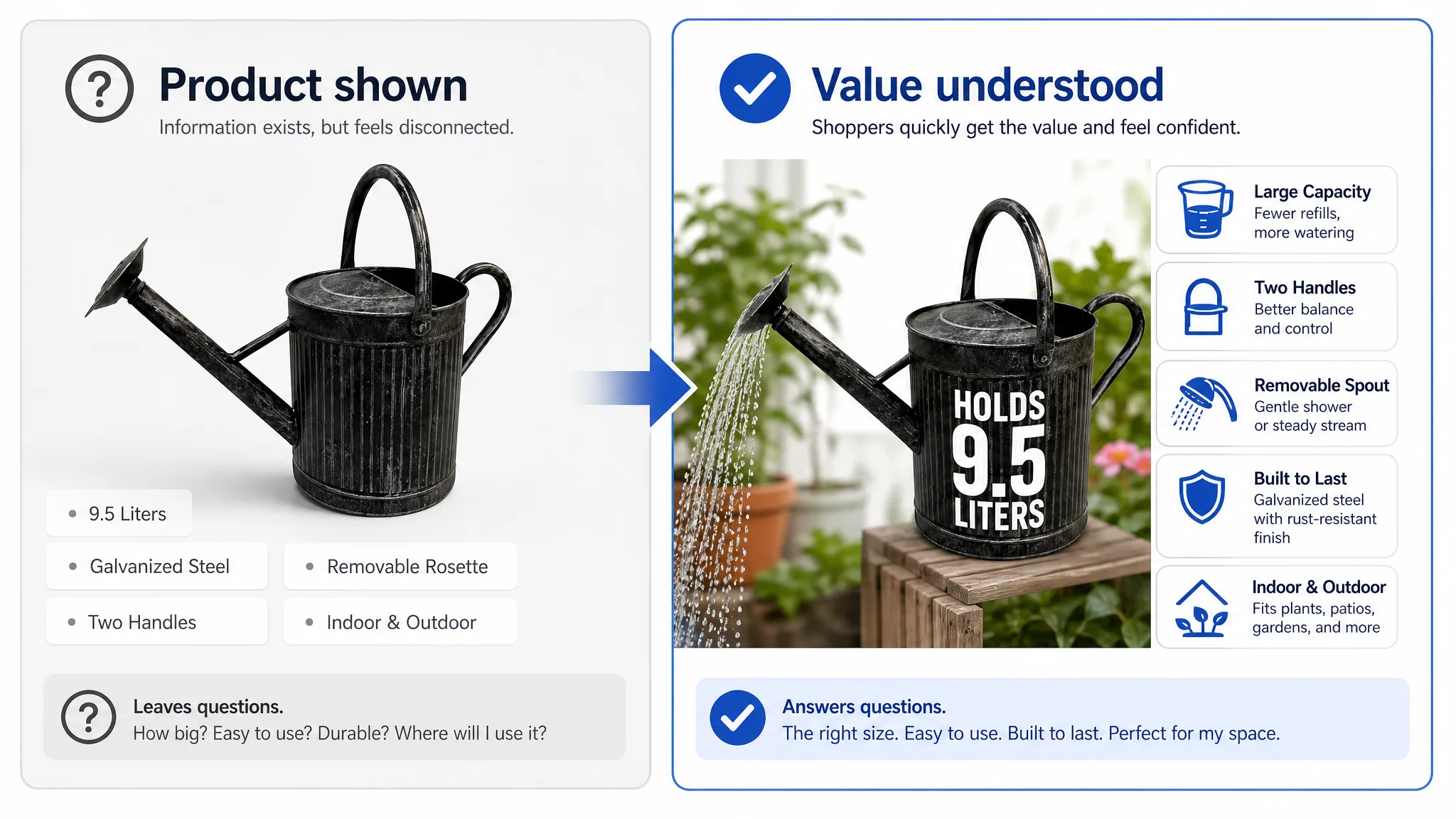
This becomes clearer when looking at a garden watering can Listing that had a product, basic specifications, and brand information, but still struggled to communicate a convincing reason to buy. The page mentioned capacity, handles, a removable rosette, galvanized steel, and indoor or outdoor use. However, these details appeared as separate facts rather than as a connected path toward purchase.
The Listing received a score of 34 out of 100, compared with 83 out of 100 for a comparable benchmark Listing. The title and bullet points were weaker, but the largest gaps were in the main image presentation and A+ content. That pattern showed that the problem was not simply “insufficient copy.” The page described the product without helping shoppers evaluate its scale, handling, durability, and intended use.
This is why AI-generated content often goes wrong. It can turn available information into fluent sentences, but it cannot automatically determine which missing proof is preventing the shopper from making a decision.
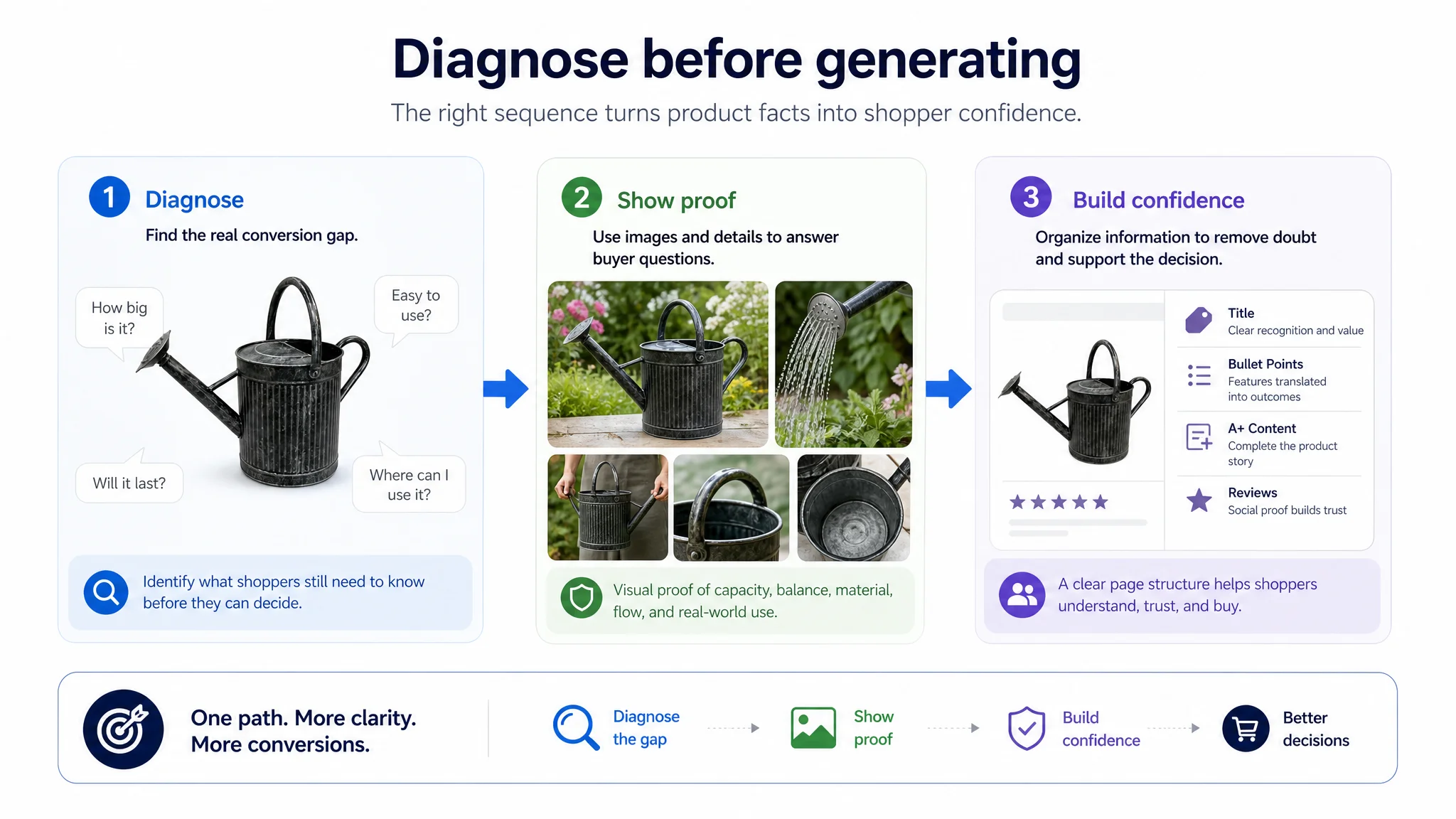
Start with diagnosis, not copy generation
That is why, when DeepBI optimizes a Listing, the first step is not generating copy. It starts with diagnosis. Once you enter an ASIN, the system automatically identifies competing products in the same category and compares their titles, bullet points, main images, detail pages, and customer reviews side by side.
The goal is to first understand where exactly the current page is falling behind. Are the keywords not precise enough? Are the selling points presented in the wrong order? Or does the title contain plenty of information while still failing to communicate the product's core value clearly?
DeepBI first scores the Listing, then ranks the problems by their potential impact: what should be fixed first, what can wait, and how far should each part be optimized. This step matters, because sometimes the biggest problem with a Listing is not the copy at all. The title may already be solid while the real gap is the main image. Or the images may look highly professional, but the detail page fails to explain real-world use cases, leaving shoppers hesitant to buy even after they click through.
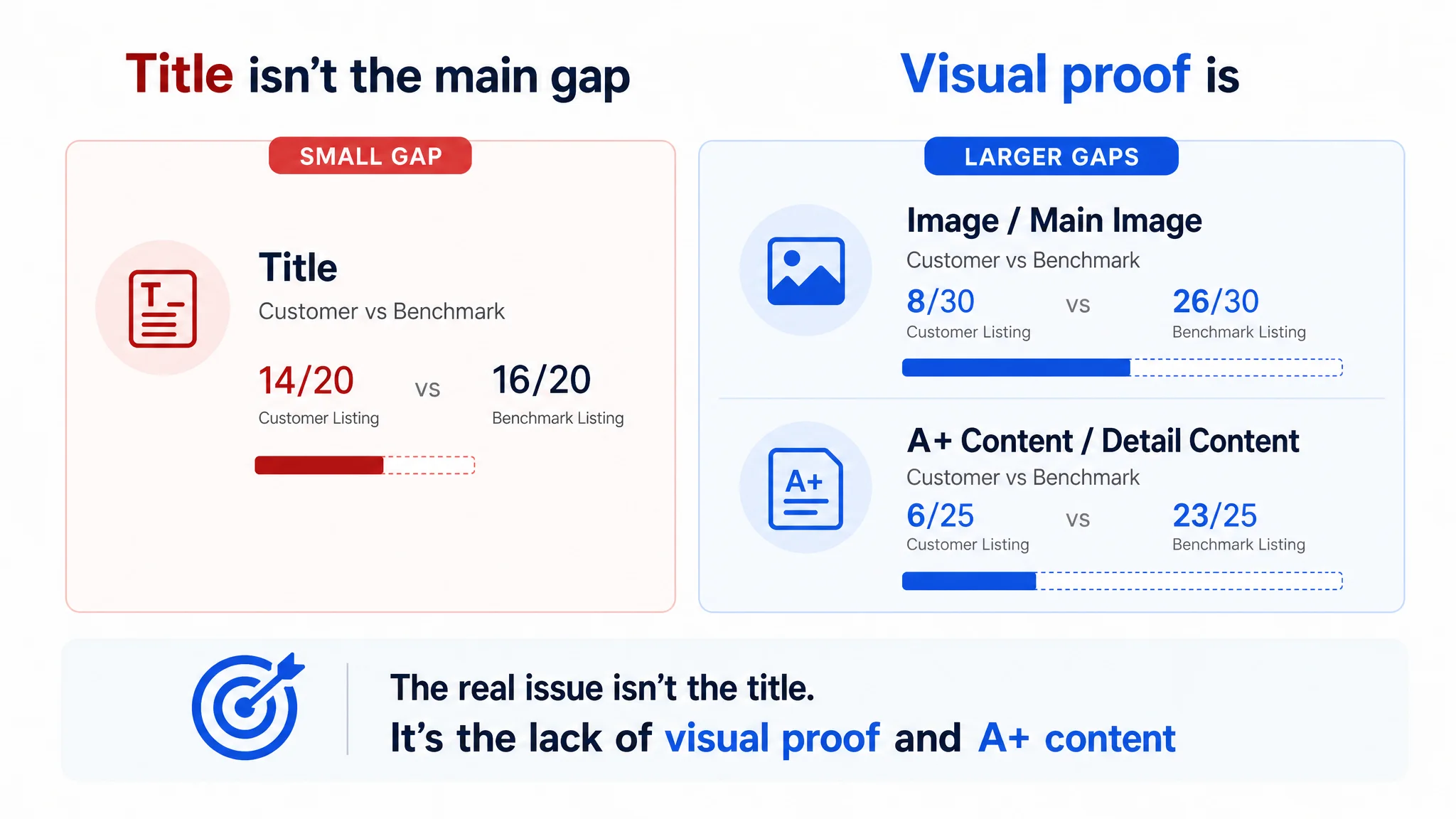
The watering can comparison showed why this prioritization matters. The title scored 14 out of 20 for the customer Listing and 16 out of 20 for the benchmark. That was a real gap, but it was relatively small. The main image and image presentation scored 8 out of 30 compared with 26 out of 30, while A+ and detail content scored 6 out of 25 compared with 23 out of 25.
A seller looking only at the title could easily conclude that better keywords were the first priority. But the score distribution pointed to a different diagnosis: the page’s larger weakness was its ability to help shoppers understand and trust the product. The issue was not that the product had no information. It was that the information was not presented in the places where it could influence the decision.
That distinction prevents teams from repeatedly adjusting the wrong part of the Listing. If the real gap is visual proof or page structure, generating another title variation may improve wording without improving conversion capacity.
Rebuild copy around information priority, not keyword density
Only after identifying the actual problem does copy optimization begin. DeepBI combines product information, keywords, and competitor structures to reorganize the keyword set. Which terms are core product keywords? Which describe functions? Which relate to materials, specifications, target users, or usage scenarios?
But this is not simply a matter of finding the most frequently used terms and stuffing them repeatedly into the title. High frequency only tells you that a term is common; it does not mean the term is necessarily right for your product. You also have to consider relevance, purchase intent, and whether the product genuinely supports the claim behind that keyword.
The watering can Listing illustrated this difference at the product-language level. Its title placed the brand name first and used “Removable Rosette,” which may be technically understandable but is less familiar to general shoppers than “Removable Spout.” It also gave less prominence to the core product phrase, capacity, material, and usage scenarios.
The solution was not to add every possible garden-related keyword. The title needed to make the product immediately identifiable as a 9.5-liter metal watering can, while communicating relevant attributes such as galvanized steel, indoor and outdoor use, and the two-handle design in a readable order. In other words, the keyword structure had to support both search relevance and fast shopper comprehension.
Next, DeepBI restructures the title and bullet points according to information priority. The title should first help shoppers confirm what the product is, what its most important function is, and what the key specifications or differentiators are. The bullet points then continue the story: the first bullet focuses on the primary reason to buy, while the remaining bullets expand on usage scenarios, product details, how it works, and trust-building information—instead of using all five bullets to repeat the same selling point in slightly different ways.
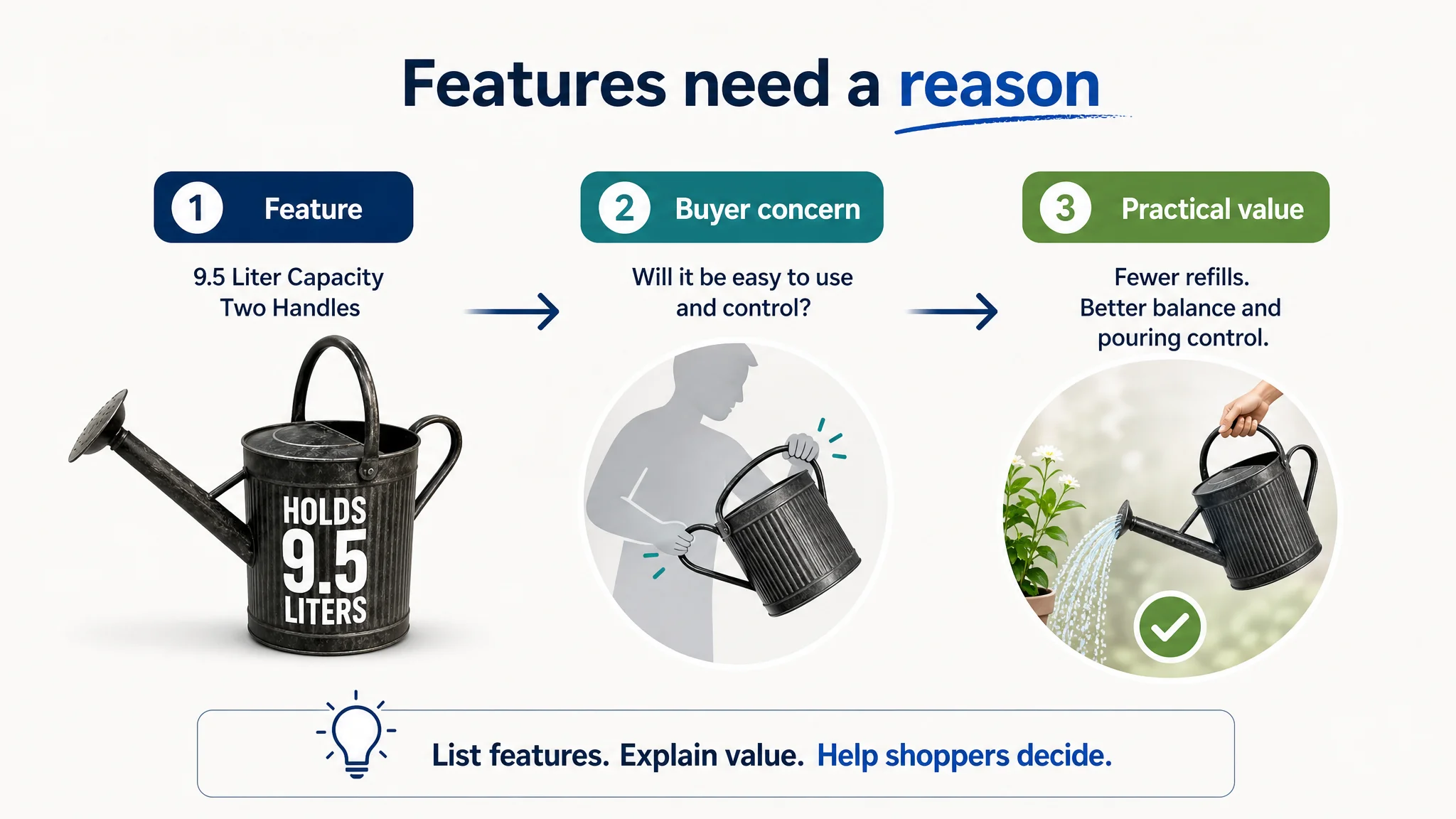
For the watering can, capacity was more meaningful when connected to fewer refilling trips. Two rounded handles mattered because they could support balance and pouring control. The removable spout mattered because it created different water-flow options: a gentler shower for delicate seedlings and a steadier stream for established plants. Galvanized steel and powder coating mattered when connected to solid construction, rust resistance, and leak resistance.
This is the difference between listing features and explaining value. The product information may remain the same, but the shopper’s understanding changes when each attribute answers a practical concern.
Text alone isn't enough: coordinate images and A+
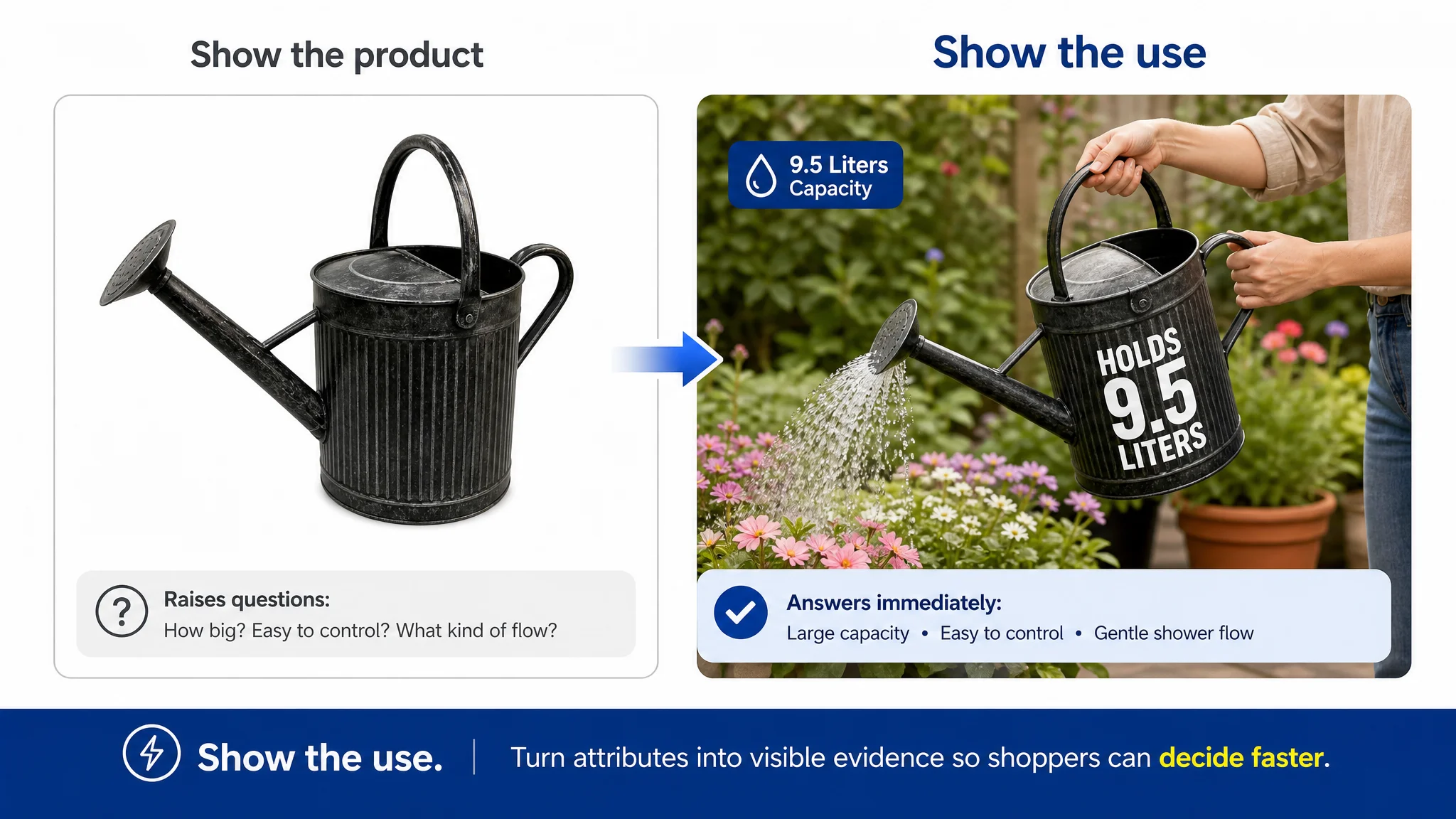
And once the copy is generated, the job still isn't finished. Because shoppers do not only read text. If the title says the product is waterproof, the images should prove it in a waterproof-use scenario. If the bullet points say it is portable, the detail page should show its dimensions, storage method, and how it is used.
The same principle applied to the watering can. Its page mentioned a 9.5-liter capacity, metal construction, two handles, and a removable rosette, but the visual presentation did not make those features easy to understand. The main image primarily identified the product and its color. It did not sufficiently communicate scale, handling, material quality, or use context.
The benchmark Listing, by contrast, used a broader visual sequence:
- Product presentation in a relevant garden or home setting
- Size and capacity cues
- Dimension and feature callouts
- Close-ups of the material and finish
- Human interaction with the handles
- Usage scenes that made the product easier to imagine
This is not simply a matter of making images more attractive. It is about reducing the amount of work shoppers must do to interpret the product. A large watering can may prompt practical questions: How big is it? Can it be filled easily? Will it be difficult to control when full? What does the removable spout actually change? Can it be used indoors as well as outdoors?
If the images do not answer those questions, later copy has to work harder to recover attention and trust. The image problem in this case was therefore a decision-speed problem: the page made shoppers work too hard to understand why the product was practical.
Based on the diagnostic results, DeepBI can also generate optimization recommendations for the main images and detail page, while previewing how the optimized Listing would appear on Amazon. This allows the title, images, bullet points, and A+ Content to all support the same purchase journey.
For example, the first image should establish the product’s identity and substantial 9.5-liter capacity. A specification image can clarify verified dimensions. A close-up can show the galvanized steel, powder-coated finish, and handle construction. Another image can demonstrate both handles during a controlled pour, turning “two handles” from a structural detail into evidence of better control. A split visual can show the difference between the attached spout’s gentle shower and the steadier stream available when it is removed.
The A+ page then needs to extend this logic rather than repeat the title. In the watering can example, the customer’s A+ content consisted mainly of a static product image and a brand logo, while the benchmark used a fuller sequence: relevant setting, capacity, material details, handling, water flow, indoor and outdoor applications, and brand reinforcement.
That sequence follows a practical decision path:
Attract attention → establish usefulness → resolve doubts → demonstrate operation → broaden use cases → reinforce the brand.
The brand logo was more useful at the end of that sequence, after the product had earned attention and addressed practical questions. A+ Content should not lead with brand exposure when shoppers still need to understand whether the product can perform the job and fit their lives.
Finally, the system checks product specifications, materials, certifications, and performance claims. If something is not supported by the actual product information, it should not be used simply because AI made it sound convincing. Clearer communication is valuable only when it remains accurate.
The takeaway
So when it comes to using AI to write Amazon Listings, the hardest part has never been generation. The hard part is identifying the right problem before generating anything. It is not about stuffing more keywords into the copy; it is about making sure every important piece of information appears exactly where it can have the greatest impact.
The watering can Listing demonstrated why this diagnosis has to happen before traffic or copy is aggressively optimized. The page had a title, feature descriptions, and brand elements, but its largest weaknesses were in visual presentation and A+ content. The product was present, yet the page did not sufficiently establish scale, usability, durability, or use cases. More traffic would not automatically solve those missing decision points.
AI can write an Amazon Listing in minutes. What DeepBI is designed to do is first figure out what that Listing should actually say, what it needs to show, and which problem should be addressed first.
A strong Listing is not a collection of polished text, attractive images, and brand modules. It is a coordinated conversion system. The title creates recognition, the images provide proof, the bullet points translate features into outcomes, and A+ Content helps shoppers complete the story. When those elements work together, AI generation becomes useful because it is guided by a clear understanding of the page’s real conversion gap.